SetUserFTA has now its own domain: https://setuserfta.com and this page will only remain for historical reasons.
SetUserFTA sets User File Type Associations per command line or script on Windows 8/10/11 and Server 2012/2016/2019/2022.
ATTENTION: if SetUserFTA does not work for http, https and .pdf, please read my blogpost about the UserChoice Protection Driver
the story:
recently i had to fight a lot with windows file type associations. microsoft changed the way how it works drastically and it is a pain for an administrator to set or to roam FTA’s. if you followed my blog, you noticed that i already have two posts about FTA on server 2016. hopefully this one will be the last – because its the missing piece of the puzzle!
i will just quote microsoft on this issue (or feature?):
In Pre-Win 8, apps could set the default handler for a file type/protocol by manipulating the registry, this means you could easily have a script or a group policy manipulating the registry. However In Win 8, the registry changes are verified by a hash (unique per user and app) that detects tampering by apps. In the absence of a valid hash, we ignore the default in the registry.
Microsoft offers a solution with GPO, but it is Computer-based and not User-based – and rather complicated. this means, you can not associate your Users on the same Server/Client with different file types. for example:
you have a PDF viewer and a PDF editing software on your XenApp server. Now you want that a certain group opens their PDF’s in the editor and the others only in the viewer (for licensing reasons for example). this is NOT possible anymore and Microsoft states “it is by design” and “this is a security measure”.
the hash is secret. Microsoft will not share it with you and obviously doesnt even share it with Citrix – this made me angry and angry me doesnt like a broken system. because i am into reverse engineering and security, i decided to look for the hash algorithm – and yes, i succeeded.
but ever thought about why microsoft is doing this? is it really about malware hijacking or maybe it is all about “setting our defaults and you must accept them”? why not simply display a popup where the user has to confirm an FTA change?
<TL><DR>
a filetype is protected by a hash in the user registry – for example:
HKCU\SOFTWARE\Microsoft\Windows\CurrentVersion\Explorer\FileExts\.txt\UserChoice\Hash
if the secret hash doesn’t match, the file type association is not being used and the system default kicks in.
SetUserFTA generates this secret hash for a supplied extension.
</TL></DR>
how to use SetUserFTA:
i made it very easy for you and the only thing you have to supply is the extension and the ProgId (optional since Version 1.1, a groupname). it works just like assoc.exe:
SetUserFTA.exe extension progid (optional:Groupname)
or
SetUserFTA.exe configfile
and since v1.7
SetUserFTA.exe get
will show all protected filetypes, just like GetUserFTA
SetUserFTA.exe del extension
will delete an association from the user registry
Example:
SetUserFTA.exe .pdf AcroExch.Document.DC
this will associate .pdf file with Acrobat Reader for the current user.
SetUserFTA.exe .pdf AcroExch.Document.DC “Adobe Acrobat Users”
this will associate .pdf files with Acrobat Reader only if the current user is member of the “Adobe Acrobat Users” group. if the group contains spaces, you must use quotes.
SetUserFTA.exe \\mydomain.local\fileshare\SetUserFTAconfig.txt
this will read all associations from the config file and set them. the file can be on a share or locally. just add every filetype on a new line like this:
.pdf, AcroExch.Document.DC, GRP_Adobe_Reader
values have to be separated by a comma. the group is optional.
using a config file, group names with spaces must not use quotes (but using SetUserFTA per command line they have to).
Note: you can supply a domain with the group name like “DOMAIN\Adobe Reader” or even in UPN format.
a valid config file could look like this (since v1.7 you can add comments by starting a line with #):
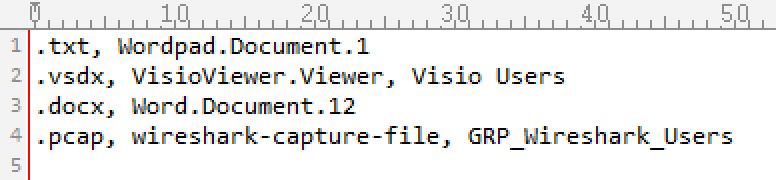
to create such a config file, you can run “SetUserFTA get >config.txt“. since version 1.4 SetUserFTA also supports protocol handlers in the config file (mailto, https, http, etc) – but http and https will be ignored on Windows 1607. use SetDefaultBrowser instead.
you can find the ProgId’s also in the registry or with assoc.exe. the easiest way to get what you need, is to manually associate a software with a filetype and then use “SetUserFTA get” or check this registry key for the values (replace .log with your extension):
HKEY_CURRENT_USER\SOFTWARE\Microsoft\Windows\CurrentVersion\Explorer\FileExts\.log\UserChoice
SetUserFTA will get the current users SID, the registry timestamp and calculates the hash. it will write it (including the ProgId and the extension) to the user registry under the subkey referenced above.
how can i deploy this?
here are some ideas (if i missed a good one, please let me know):
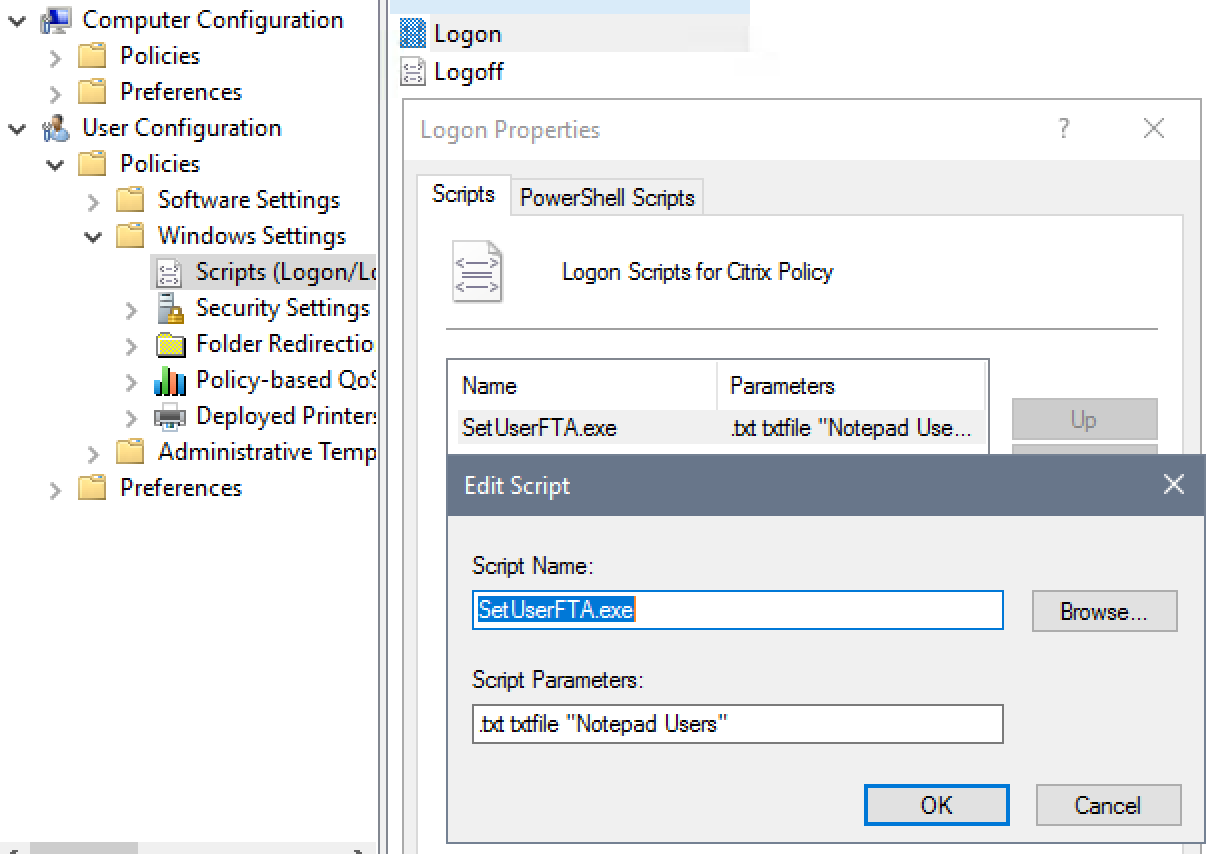
- use the logon script feature in a GPO (my favorite way)
- powershell login script in a GPO
- a legacy bat/cmd logonscript
- the Run or RunOnce registry key in HKEY_CURRENT_USER
- the startup folder in the startmenu
- any software deployment solution like SCCM
- a scheduled task
- GPO: User Configuration\Administrative Templates\System\Run These Programs at User Logon
- Citrix WEM (blog post by James Kindon)
- VMware UEM (blog post by Ivan de Mes)
its up to you. be creative 😉
IMPORTANT: SetUserFTA must run in the users context – no administrative or system privileges. sometimes the timing can be important as well – make sure it runs after the profile of the user is loaded.
Example:
Tips:
here are some tips which can help you to find the associations that you need:
- ProgIDTool: My own little tool to manage File Type ProgID’s.
- assoc.exe | find “.txt” – this will list the ProgID for txt files (only from HKLM)
- ftype.exe | find “txtfile” – will list the executable associated with the ProgID txtfile (only from HLKM)
- reg.exe query HKCU\SOFTWARE\Microsoft\Windows\CurrentVersion\Explorer\FileExts\.txt\UserChoice /v ProgId – gets the ProgId of the User FTA for your file extension
- if you encounter a ProgId that looks like “Applications\uedit64.exe“, you need to deploy the corresponding entry from “HKEY_CURRENT_USER\SOFTWARE\Classes” as well. to roam it with UPM in a Citrix environment you can use my workaround.
- you can override HKLM associations (ProgId’s) in HKCU. for example: HKEY_CLASSES_ROOT\.vsdx can be imported to HKEY_CURRENT_USER\SOFTWARE\Classes\.vdx and then it will has precedence. if you do that, you need to roam it properly (UsrClass.dat).
- if you still see the OpenWith dialog (especially after adding new applications: “keep using this app“) you can disable this feature with this registry key:[HKEY_LOCAL_MACHINE\SOFTWARE\Policies\Microsoft\Windows\Explorer]
“NoNewAppAlert”=dword:00000001
this registry key also works with HKEY_CURRENT_USER!
the GPO Do not show the ‘new application installed’ notification (Windows Components, File Explorer) will only work on HKLM – it sets the exact same registry key
F.A.Q.
where did you get the hash algorithm from?
i reverse engineered it.
does this mean you did reverse engineer windows itself to recover the algorithm?
exactly.
which tools did you use for that?
which language have you used to code the app?
v1.0 – v1.1.1: assembly. compiled in Tasm (Borland Turbo Assembler) – i know, very oldschool.
v1.2 and up: gcc and Microsoft Macro Assembler (to create an obj file).
v1.4 is now fully coded in C/gcc
v1.7 is compiled in tcc
v1.7.1 is using gcc again, because tcc caused to many antivirus false positives
by assembler you mean machine code?
yes.
which platforms does this work on?
i have tested it on windows 8/10 and server 2012/2016/2019 up to build 1809.
is it 32bit compatible?
yes. x64 and x86 (the binary is 32bit).
can i have the source code?
no. you can however ask for a quote and select the source code option if you want to implement the functionality in your own product.
is unicode supported?
group names can contain unicode characters, but extensions or ProgId’s not. the “get” parameter supports unicode already. SetUserFTA 2.0 will support 100% unicode.
can it also generate hashes for protocols (http, mailto, etc)?
yes, but http and https wont work on 1607 or lower. please use my SetDefaultBrowser instead.
are there any other limitations?
not at the moment. version 1.2 adds verbose output and some basic error handling.
can i break something with your app?
not really. the only thing that can go wrong are the file type associations, but it will only affect the current user and not the machine. the del parameter is destructive, but if you do something wrong, it can be fixed by using SetUserFTA again with proper parameters.
which privileges are needed to run this app?
just plain user privileges.
The download is not available anymore since SetUserFTA is now a commercial product. Please visit https://setuserfta.com for more information.
If you plan to use SetUserFTA in a commercial or professional (non-private) environment, you can request a quote on this link: https://setuserfta.com/request-a-quote/
ATTENTION: if SetUserFTA does not work for http, https and .pdf, please read my blogpost about the UserChoice Protection Driver
Version 1.1 – adds support for group membership checking
Version 1.2 – is completely rewritten in C. it also offers now verbose output on errors
Version 1.3 – new funtionality: multiple file type associations with a configuration file
Version 1.4 – support for protocols like mailto, https, http, etc (only for Windows 1703 and newer)
Version 1.5 – support for Windows 8.x and Server 2012/R2
Version 1.6 – added protocols (except http and https) support on 1607 or lower builds
Version 1.7 – get and del parameters added, # char for comments in config files, EULA
Version 1.7.1 – fixes false positive antivirus detections
Version 1.8.1 – works with Microsoft UCPD.sys active. Available from https://setuserfta.com as personal edition.
Hello, thanks for your work.
I cannot execute your exe, getting this error :
SetUserFTA.exe is not a win32 Valid application.
Unziping the archive also give an error (Data Error)
this is most likely caused by your antivirus software – this version gets a lot of false positives. i am working on a new version that will resolve that issue.
UPDATE: try with version 1.2. its completely rewritten and should work fine now.
Hi Admin, I have a requirement there are list of applications have been mapped by using the DefaultAppassociations.xml via policy as it is working as expected. However another requirement raised by the user as they wanted to change the Internet Explorer when needed by the user and it shouldn’t be changed for other application extensions. Can you please help me how to achieve this as I tried through the registry by changing the ProgID as this gets corrupted the entry due to HASH algorithms. Thanks.
just use my SetDefaultBrowser for that: https://kolbi.cz/blog/2017/11/10/setdefaultbrowser-set-the-default-browser-per-user-on-windows-10-and-server-2016-build-1607/
But you also can user SetUserFTA – when you have a windows build higher than 1703. you just have to set http and https and it will change the default browser. sadly this does not work on older builds and therefore you can use SetDefaultBrowser.
This tool is a life saver for anyone that is responsible for an environment that has Windows 10 or Server 2016. Thank you!
Awesome article and this has helped me greatly. I have been able to associate PDF to Adobe reader but it does not look like I have gotten it done completely. When I double click on a PDF file I get an error saying “There was an error opening this document. this file cannot be found”. I get this 5-6 times and then it goes away. With Adobe reader open I then click file, open and choose the exact same file I just double clicked on and it opens perfectly. What am I missing?
did you try that with different pdf files? from where do you open them? network drive? does the same happen from a local drive?
Hello,
i am trying to do it with logo script by gpo and its not working. when i am running it from command line on the user session is it work.
do you have any ideal what is the reason?
have you tried to disable the logon script delay?
https://support.microsoft.com/en-us/help/2895815/logon-scripts-do-not-run-for-five-minutes-after-a-user-logs-on-to-a-wi
can you try to run the exe with: https://support.microsoft.com/en-us/help/240791/how-to-run-programs-automatically-when-a-user-logs-on
How many hours did I spend searching for a solution before finding that tool?
Anyway, thanks a lot, the time saved will be incredible.
For some reason, however, the tool only works for our computers in English. I guess the “experience” string might change according to the language.
the string is hardcoded and cannot change. but maybe the filetype string changes? maybe this is caused by special letters (unicode characters maybe?)
can you give me an example of something that is not working? which filetype and which progid doesnt work?
I tried SetUserFTA.exe .pdf AcroExch.Document.DC
I checked the progID, it doesn’t change with the language.
The Bios ends up unmodified (= on microsoft Edge).
thats fine then. which language are you using? actually microsoft os is always english, they just use language packs, so this can not be an issue. which operating system and which build are you using?
We’re using Windows 10 Enterprise, build 1703, in French.
I will run tests with other software/file types.
are you running SetUserFTA manually or with a script?
I started with a script, which worked on English builds, then noticed it didn’t work on a French build. When I tried it manually, it didn’t work either.
However, on a computer that was installed in English, then swithced to French, I don’t have any issue.
interesting – im pretty sure i tried it on german systems aswell. i have sent you an email 🙂
I see that you have recently added support for server 2012 R2. Does this include protocols? I am specifically looking for a Mailto protocol and to associate it with Office 2013. No matter how I configure it I cannot get it to go to outlook.
SetUserFTA.exe mailto, Outlook.URL.mailto.15 or by pointing it to a config file I pull from GetUserFTA I cannot make it point to Outlook.
no. protocols only work on Windows 1703 and higher. that is because in older versions you need to specify the path of the protocol app aswell. i did only implement this in SetDefaultBrowser, but never for mailto. i might create a SetMailTo in the future, when i find time for it.
but if you want Outlook for all your users, you can of course use the AppAssoc.xml with dism and GPO to set your default mail client.
Hi,
I’m also searching a method like this.
Is an app like SetMailTo already available?
@jmortimore_nc:
Did you found a solution?
Regards
Patrick
just use “SetUserFTA.exe mailto Outlook.URL.mailto.1” for example.
I was trying to use this tool to associate file extensions in Windows 10, but invoking from InstallShield script doesn’t runs. It seems like this tool doesn’t work with SYSTEM user previliges, since InstallShield script runs the process under SYSTEM user account. At the same time, You also have stated that “just plain user privileges” are needed to run. Any remedies for this situation?
the tool will run with system privileges, but then it will change the association only for the SYSTEM user. you cannot set user associations from a different context. you have to run it with the user that you want to set the associations. if you can apply the settings to all users on the same machine, please use the official microsoft solution: https://blogs.technet.microsoft.com/windowsinternals/2017/10/25/windows-10-how-to-configure-file-associations-for-it-pros/
my tool does exactly what microsoft doesnt offer: you can set associations per user instead of the machine, but for that you must run it in the user context. you can use startup, run, runonce or similar ways to make it run as a user – instead of using InstallShield.
Awesome tool! Is there any setting that can be made to prevent Windows from asking “How do you want to open this file?” So that the user has to tick the “alway use this app to open .xxx files” to prevent this from popping ?
where do you see that? which windows build and which filetype? actually my tool does exactly that – but if windows finds a new handler for a certain filetype, it might show that popup again.
Thank you so much for this amazing tool, after weeks of pulling my hair on how to change the file Assoc. You finally offered us the solution. I am using it with OSD on SCCM. One thing tho as mathias_k mentioned it prompt users with the “Ho do you want to open this file?” menu and has the box at the bottom “Always use this app to open” unticked. I have to mention I have ran it manually using the config.txt file on a running machine and worked fine didn’t get this pop up, but when it was part of the automated deployment the end users getting prompt with the menu I mentioned above. It’s not a big of a deal, just wanted to let you know about this behavior and thanks again for the amazing tool.
can you give me more information about the Windows version and the file type where this happens?
The windows version is Windows 10 1709, and it only did that with the .pdf extension, but worked fine when I assigned the .html to chrome and I didn’t get the prompt. However I have found a work around the issue and created this .reg file that disabled this “How do you want open this file” menu.
[HKEY_LOCAL_MACHINE\SOFTWARE\Policies\Microsoft\Windows\Explorer]
“NoNewAppAlert”=dword:00000001
adding this key with your tool is all I needed to finish off my project. Thanks again :).
thanks a lot for this information. this is very helpful! cheers
Really nice work.
And I can at least partly understand why you do not want to release the source code. On the other hand, that unfortunately means I cannot make use of it, since I have some responsibilities towards my employer and my users.
i dont really understand your concern. windows is a closed-source OS and most of the applications on it as well. i have very well documented my work and its completely clean on virustotal. SetUserFTA has been downloaded multiple-thousand times and it has a very good reputation.
in my eyes an administrator has a responsibility yeah – bringing the best possible user experience to the users – and that is what my tools do 🙂
The challenge for me is that while Windows is a closed source system, it is approved. I’m looking to use this on a government owned system. Feel free to reach out to me to discuss options for meeting those guidelines.
sent you an email
WinServer 2016, 1607 not working
SetUserFTA.exe mailto, Outlook.URL.mailto.15
error: protocols are not supported on Windows 1607 and Windows 8/Server 2012
like the error states, my tool does not support protocols on 1607 – but i will release a tool for that soon.
the newest version of SetUserFTA now supports 1607
I have a strange behavior with this tool.
First of all i tried to set filetype .pdfxml / .acrobatsecruitysettings and that does not work. It will be ignored. Maybe filetype to long?
The second one is. I used an Configfile to get .pdf registered. It will be run as a task on logon of the user. Everything is fine. Reader is associated and opens fine. Then a gpupdate runs after some time and .pdf is reverted to Microsoft Edge.
Do you have a clue why?
We do not set the filetype elsewhere. This is on 1709 (16299.492).
the size of the extensions is max 255 chars, therefore it cant be too long. can you check with GetUserFTA if the entry is written? or manually in the registry under HKCU\SOFTWARE\Microsoft\Windows\CurrentVersion\Explorer\FileExts\.extension -> here should be a UserChoice key and the hash should change every time when you run SetUserFTA.
when gpupdate changes a extension, there must be something in a policy. are you sure you dont have the “Configuration\Policies\Administrative Templates\Windows Components\File Explorer\Set a default associations configuration file” configured in a gpo?
Sorry my fault, it was the application\Acrord32.exe for both extensions. They are not very important so this does not matter. Currently it is to much work to put in all classes into each user.
The second one: We do not set default app association via GPO. I have exported and imported them with dism once and only on my computer. Maybe there is some sort of Problem.
Prior to this i deleted OEMDefaultAssociations.xml
I opened CMD
assoc | findstr “.pdf” Output: .pdf=AcroExch.Document.DC
GetUserFTA Output: .pdf, AppXd4nrz8ff68srnhf9t5a8sbjyar1cr723
Then run: SetUserFTA .pdf AcroExch.Document.DC
Assoc | findstr “.pdf” Output: .pdf=AcroExch.Document.DC
GetUserFTA Output: .pdf, AcroExch.Document.DC
Run gpupdate
Assoc | findstr “.pdf” Output: .pdf=AcroExch.Document.DC
GetUserFTA Output: .pdf, AppXd4nrz8ff68srnhf9t5a8sbjyar1cr723
I will check that on a clean system.
sorry for my late response. this comment landed in the spam box. but if the association is getting overwritten by a gpupdate, you most likely have the assoc.xml in a GPO somewhere.
https://blogs.technet.microsoft.com/windowsinternals/2017/10/25/windows-10-how-to-configure-file-associations-for-it-pros/
Great tool, Christoph. You really did a great job! I knew about the hash issue as I monitor registry changes before I try to reproduce them using scripts or batch-files. But I never thought that I would find a tool that can compute this hash.
A few remarks and questions: (Windows 10 Pro en-us 1803)
1) Regarding the config.txt file, I had to save it in ANSI to be able to use it. Otherwise I am getting an error message about a comma.
2) I use many portable apps (in folders on my HDD) – also video/music players.
So, I used SetUserFTA with a config.txt to associate over 100 extensions with ‘Applications\VLCportable.exe’. After that – as a test – I did the same with ‘Applications\SMPlayerPortable.exe’. And then again with ‘Applications\VLCportable.exe’.
But the ProgID ‘Applications\VLCportable.exe’ had been deleted!? How come?
I had to associate one video extension with VLCportable manually once again and then it worked again.
3) In your ‘tips’ it reads:
QUOTE
if you encounter a ProgId that looks like “Applications\uedit64.exe“, you need to deploy the corresponding entry from “HKEY_CURRENT_USER\SOFTWARE\Classes” as well.
UNQUOTE
This would apply to ‘Applications\VLCportable’, too. Can you please explain what exactly you mean here. For me there was no need to write anything else to the config.txt. but this
.3ga, Applications\VLCportable.exe
.669, Applications\VLCportable.exe
.a52, Applications\VLCportable.exe
…
4) Can you tell me the minimum requirements needed, to add e.g. a video player to the list to choose from in ‘Windows Default Apps’ settings? In the selection window for videos you would normally find only these:
– Movies & TV
– Photos
– Windows Media Player
– Look for an app in the Store
However, after I associated over 100 extension with VLCportable, I could find VLCportable there, too. How come?
Hope, these were not too many questions 🙂
Regards
Stefan
sorry for the late response, i was quite busy – that are a lot of questions… let me try to answer them all 🙂
– you are right about ansi. i never tried a different format and never had a request for it. unicode strings are not supported atm, but maybe i can address that in a future update
– i dont know why Applications\VLCportable.exe was deleted. SetUserFTA does only create the UserChoice keys and nothing else. all other registry keys must exist or be created before to have a proper association
– my note about HKEY_CURRENT_USER\SOFTWARE\Classes means exactly that. you must pre-create the key if you automate something with SetUserFTA. it has nothing to do with the config file from SetUserFTA at all
– i never analyzed what exactly is needed to show a program in the openwith dialog, because i dont even want to use it at all. users should not see that dialog at all in the best case and if all registry keys for a file associations match, you can avoid exactly that with SetUserFTA – but ill have a look. that is an interesting question 🙂
Thought I would receive an email notification about the approval of my comment and/or any answers or comments. That’s why it took me so long to realize that you already answered…
Now, thanks a lot for taking the time to answer my questions 🙂
Regarding the ANSI issue, this isn’t really a problem, but the user needs to know that it has to be ANSI. The error message doesn’t give you a clue what’s wrong. So, it might make sense to add a hint to the error message text.
But as far as I am concerned, now I know it 🙂
Thanks again and best regards,
Stefan
turns out, that wordpress does not do that without plugins. installed the corresponding plugins and you should get notified now. thanks for letting me know.
Email Notification:
Yes, now notification works 🙂
Thanks!
However, you cannot send a reply to the sender mail address. That’s why I’m answering here.
Mostly true, but you added some made up items. Why?
“this includes a funny detail – regdate is the timestamp of the UserChoice key in the registry. i didn’t even know that registry keys have timestamps and as soon you modify the key, it will change the timestamp and the hash is not correct anymore.”
Easily disprovable, given that the hash code is the same regardless of when the key and value are created.
“experience = “a microsoft secret string”; a static string (this is a dummy example, not the real string)”
No. Not part of the hash generation algorithm.
you are right when talking about Windows 8, but move on to Windows 10 to confirm that im not making up anything at all.
Interesting tool! But when i download this, Norman Virus Control gives an malware warning (Trojan.Heur.FU.dm0@aK5Dkooi) on the SetUserFTA.exe file. (How) can i safely use this?
this is a false positive – like the name already states its caused by heuristics. please try the older version, wich was compiled with a different compiler: https://kolbi.cz/SetUserFTA_v1.6.zip
Perfect! NVC is quit now 🙂
HI and thanks for a great tool!
Will there be added support for protocols? (http and https)
Do you have any tip on how to best handle these in the best way. Per user, not per machine.
Regards
Fredrik
This is in a Windows Server 2016, Terminal Server, Roaming profile environment.
this is not planned atm – if you want to change those protocols use my SetDefaultBrowser instead. what do you want to achieve exactly?
Hi and thanks for your quick reply.
I have now managed to achieve what I wanted by using a combination of SetDefaultBrowser and SetUserFTA.
I wanted the user to choose what Browser to be Default (IE vs Chrome), and that the browser choice settings will be kept at next login. 2016 Terminal Servers with Roaming Profiles.
I made a small app in PS where users can choose their default browser. This app run both your tools and also writes a Value to the HKCU in registry.
In GPO I have set Item-level targeting which looks for this registry value, and applies the correct browser with in a login script with your tools.
Seems to work perfect!
Thanks again 🙂
Hi Christoph, thank you for this nice tool! We have an issue with setting the file association for .XML. When we apply a config file, the associations for all other file extensions work except the XML that we try to associate with Excel. (.xml, Applications\EXCEL.EXE). If we associate .xml to Excel manually once and then for example assign it to Notepad, and then run SetUserFTA.exe again with the same config file it works. Can you explain this behavior? We have no policies that force xml associations what so ever. Hope to hear from you.
Ronald
most likely this means that Excel is not properly registered under Applications – but did you try to associate the xml with a already known progid like Excel.Sheet.12 (assuming its office 2016)?
SetUserFTA.exe .xml Excel.Sheet.12
Hi Christoph, that worked like a charm, thank you!
Hi Christoph, thank you very much for these nice utilities.
What about completely silent versions without console flashing window? Both Set* utilities.
how do you deploy them? because they are already silent – unless there is an error.
Hi,
I am deploying the script via registry run key.
HKCU\Software\Microsoft\Windows\CurrentVersion\Run
I am experiencing console flashing windows as well. Any solution?
that is by design, because it is a console utility. but you can use a 3rd party tool to hide it completely like hideexec, hidecon or quiet.
Hi, I’ve followed your documentation; I have a piece of software that uses a .dtd extension, I have added the reg key to HKCU/Software/Classes but running the SetUserFTA doesn’t appear to set the application that I want. It does however set Adobe Reader for .pdf under the same login script.
Is there any form of logging available so I can see where it is going wrong?
you can use “SetUserFTA.exe get” to see which associations are set for the current user. if there is something wrong, you can use “SetUserFTA.exe del” to remove an association.
if you are not sure what you exactly need, you can associate a filetype manually and then use “SetUserFTA.exe get” to see what windows changed. the easiest way to do that is just a right click on a file and select “open with, always use this app”. hope this helps.
That’s exactly what I did; set it manually and then ran the ‘SetUserFTA.exe get’ of which I get an entry like Applications\2ddes.exe. I’m not sure why it’s not applying all the associations I’ve set, it seems to do some such a .PDF but not this one or VLC for .mp4
if you get something like Applications\2ddes.exe then you must also roam or pre-create the entry under HKCU\Classes\Applications before using SetUserFTA.
Assume you mean HKCU/Software/Classes? I have that key applied on login before running SetUserFTA. Very odd. It seems HKEY_Classes_Root seems to be taking precendence still.
yeah sorry, it is HKEY_CURRENT_USER\Software\Classes\Applications. did you run a procmon to see if there is a key missing? also check if you have the file extension under HKEY_CURRENT_USER\Software\Classes too – this will override the file extension from HKEY_CLASSES_ROOT.
hi, i have reverse the hash algorithm too.MS call it some CS64??
but,in 17134(maybe later)?
file type Associations reg has be protect ACL
can not SetValue/delete value Hash or ProgId
so have any solution fix it in r3?
That protection is already in place on Windows 8 and on Windows 10 there is even an additional layer of security. If you managed to reverse the hash, you will also find ways to fix the ACL 🙂
oh yes i found it set acl access
thanks you
Thanks,This is a VERY useful tool, Microsoft are trying too hard to push their shitty browser (EDGE) and this is getting scary.. What will they do Next ? I may not be surprised if one day they decide to uninstall other web browsers (for security or another stupid reason like that).
Running a VirtusTotal scan on the newest version, I´m getting a flag
Ikarus – Trojan-Dropper.Win32.VB
Also tried with version 1.6 and get the same flag. Is there a reason to this?
https://www.virustotal.com/#/file/55b48c9e5b96f3cfd2d67543f08053204377c2355f7bae581f3b30e5281f377e/detection
yeah this is a false positive. Win32.VB is a Visual Basic Dropper and my tools are not even coded in Visual Basic.
Virus false positives:
VirusTotal
URL: http://kolbi.cz/SetUserFTA.zip
Erkennungsrate: 3 / 67
Analyse-Datum: 2018-11-07 09:52:24 UTC ( vor 0 Minuten )
Datei-Scan: Zu der Analyse der heruntergeladenen Datei wechseln
0 0
Analyse
Zusätzliche Informationen
Kommentare
Bewertungen
URL-Scanner Ergebnis
Sophos AV Malicious site
Avira (no cloud) Malware site
Kaspersky Malware site
ADMINUSLabs Clean site
AegisLab WebGuard Clean site
ich weiss, aber ich kann da leider nicht viel machen. die exe selber hat weniger false positives: https://www.virustotal.com/#/file/791dc39f7bd059226364bb05cf5f8e1dd7ccfdaa33a1574f9dc821b2620991c2/detection
witzig ist zwar, wenn man kolbicz.com oder kolbicz.ch benutzt, gibt es keinen hit:
https://www.virustotal.com/#/url/bc8c56e501599fac137d171fe299527c4b6fe01b066190facf8ccce5d028adcd/detection
https://www.virustotal.com/#/url/450e2cc414d8d194f086fc2c97bdded35c3adcbebcd85a4862f88481aeb59d9c/detection
das zeigt ja schonmal wie mies diese services eigentlich sind. pffft.
https://www.virustotal.com/#/url/450e2cc414d8d194f086fc2c97bdded35c3adcbebcd85a4862f88481aeb59d9c/detection
Sophos/Kaspersky stehen hier als unrated!
Die haben wohl meine anderen Domains noch nicht gescannt. Die sind auch nur halboffiziell, da manche Probleme mit der .cz Domain hatten. Aber ist auf jeden Fall mühsam… ich kann gegen diese false positives gar nichts unternehmen.
This tool has saved me so much frustration! Thank you.
Is there a way to set .pdf to open with Chrome? it doesn’t seem to have a progId
yeah sure – just use SetUserFTA.exe .pdf ChromeHTML
Hello. I discovered your software a little while ago, precisely because I started to be interested in the way Windows generated “Hash”. I am bad, if not horrible in reverse enginnering.
After 3 days, I think I have found some good leads.
I come here not to find answers but simply for you to tell me if I am on the right path 😉
So, I will remain discreet but if I tell you: 01d477aa???????? and “ComputeHashFromString” it tells you something ? (A simple yes will be enough for me;))
Please, excuse me for my poor English.
this depends in which shell component you are looking i think. ive seen some strings about function names, but not the one you mentioned. but i think i know what this hex means 🙂
Hi Christoph,
Just encountered a new problem:
I Installed Windows 10 1803 on Nov. 1 on a new test machine, and I cannot assign any “non-windows” program to files that are by default opened with a Windows app, e.g. videos or pictures or a pdf…
Cannot do it via the context menu (it accepts my new association – e.g. *.pdf to PDFXchangeViewer.exe -, but the file is still being opened with the Windows default app Microsoft Edge).
Same happens when I use SetUserFTA.exe which works perfectly on other installations as reported earlier.
Any idea?
Thanks and regards,
Stefan
there are some reports with Windows 10 1803 and FTA issues: https://p0w3rsh3ll.wordpress.com/2018/11/08/about-file-associations/ -> there is a powershell which claims to fix the issue… is this what you are experiencing?
actually this is confirmed by Microsoft after the October update: https://support.microsoft.com/en-us/help/4462919/windows-10-update-kb4462919
After installing this update, some users cannot set Win32 program defaults for certain app and file type combinations using the Open with… command or Settings > Apps > Default apps.
Thanks Christoph!
Didn’t find this myself 🙁
But this seems to be the problem.
So, I will wait for Microsoft’s fix for this one.
Regards,
Stefan
Windows 1809 has the same issue 🙁
Microsoft is working on a resolution and estimates a solution will be available in late November 2018.
Just FYI.
The latest update I performed today causes even more problems:
Even Microsoft apps have problems now 🙂 (((((
when trying to set them as default apps.
i have issues with .iso files on server 2019… it is late november and no sign of a patch from microsoft 🙁
Hi.
One, maybe stupid question. If I run “.\SetUserFTA.exe > .\config.txt” and then (without any changes in the config file) .\SetUserFTA.exe .\config.txt, I’ll get the following error: “error: progid empty. check your file contents – separator is ,”
The content in the file looks like your example:
.3g2, AppX6eg8h5sxqq90pv53845wmnbewywdqq5h
.3gp, AppX6eg8h5sxqq90pv53845wmnbewywdqq5h
.3gp2, AppX6eg8h5sxqq90pv53845wmnbewywdqq5h
.3gpp, AppX6eg8h5sxqq90pv53845wmnbewywdqq5h
.3mf, AppXr0rz9yckydawgnrx5df1t9s57ne60yhn
.aac, AppXqj98qxeaynz6dv4459ayz6bnqxbyaqcs
.ac3, AppXqj98qxeaynz6dv4459ayz6bnqxbyaqcs
.acrobatsecuritysettings, Applications\AcroRd32.exe
.adt, AppXqj98qxeaynz6dv4459ayz6bnqxbyaqcs
.adts, AppXqj98qxeaynz6dv4459ayz6bnqxbyaqcs
.amr, AppXqj98qxeaynz6dv4459ayz6bnqxbyaqcs
.arv, arv.config
.arw, AppX43hnxtbyyps62jhe9sqpdzxn1790zetc
.asf, AppX6eg8h5sxqq90pv53845wmnbewywdqq5h
.avi, AppX6eg8h5sxqq90pv53845wmnbewywdqq5h
.bmp, AppX43hnxtbyyps62jhe9sqpdzxn1790zetc
.config, Applications\NOTEPAD.EXE
.cr2, AppX43hnxtbyyps62jhe9sqpdzxn1790zetc
….
Whats wrong??
Thx Kai
can you try it with cmd instead of powershell? and could you send me the config.txt so i can check? thanks
With CMD it’s the same. Thx, a lot, I going to send you a message.
Kind regards,
Kai
Sorry, I thought I had tried with CMD, but now I tried again and it works like a charme.
Thx Kai
cmd does not create an output in unicode format and i suspect an error with that – powershell defaults to unicode. i will check that, but could you still send me your file that doesnt work? thanks.
You must use ANSI encoding for your config file (for example, config.txt). Note that in recent versions Windows notepad uses Unicode as default encoding, that SetUserFTA does not support yet.
sorry for the late reply. yes, that’s true for the current version. i will address that in a future update
i had a look at this and Windows 11 does use UTF as default, but its not unicode. could you supply an example maybe? thanks
Okay, where can I find a mail address? BTW, I can’t import the empty file with CMD too, it will be nice to figure out what happened.
Thx Kai
you can upload it here: https://kolbicz.sharefile.com/r-rf19a62841134d10a
thanks!
I uploaded the file test.txt to you. I wish you success
Thx Kai
thanks – i have checked it and its in UNICODE format. when you recreate the file in cmd it should work. SetUserFTA does not yet support UNICODE fully – sorry about that. its on my todo list…
Don’t worry, you do a fantastic work. I’ll test an other one. Now I have a solution, that’s enough for me.
Greetings from Germany
thx Kai
danke – hab leider einfach zuwenig zeit im moment, aber update ist geplant 🙂
How do I find an arbitrary ProgId for an application?
Say, sublime text editor 2? Or Notepad++?
the fastest way is to associate it manually (right click a file and select open with, always open with) and then run “SetUserFTA.exe get” – then you will see which ProdId was used.
Hello! We are using SetUserFTA to set PDF associations to Adobe Reader and Adobe Acrobat Pro depending on AD group membership. It works very well, BUT.. Some of the users that has been set to Adobe Acrobat Pro get changed to Adobe Reader during the day in the middle of a session. I have not found any logic in when this happens. We have remove Adobe Acrobat Pro from HKEY_LOCAL_MACHINE\SOFTWARE\RegisteredApplications\ to prevent “Open With..” for users that not has access. Could that be the cause?
Do you got any tip what can cause this?
maybe the plugin in the browser? you can also use applocker or NTFS permissions to disable acrobat32.exe completely for these users – then you maybe also find out when it gets triggered, because it will give an error.
you should give this a read: https://stackoverflow.com/questions/562038/escaping-double-quotes-in-batch-script/31413730
the only other way around that would be to use a variable to hold the password and pass the variable instead of the string: http://steve-jansen.github.io/guides/windows-batch-scripting/part-2-variables.html
C:\>set x=mypass”12
C:\>echo %x%
mypass”12
something like this should work:
set pass=My Pass”Word
unrar x -p%pass% “Archive.rar”
can you try:
set pass=My Pass”Word
unrar x -p”%pass%” “Archive.rar”
you must escape these characters. those are operators in cmd and you must escape them with ^ to use them as a string.
actually i tried to reproduce your issue and following worked:
password=My “Pass
unrar x -p”My “”Pass” protected.rar
just use double quotes where the password includes a quote. if it contains a space, you must quote the whole password.
Well that was dumb. I just needed to log the user off and back on. Forgot that that is necessary after adding a user to a new AD group.
But I’m facing another issue, this time with setting Notepad++.exe as the default program for .txt files. Here is my command that I’m running on the server (server 2016), in command prompt, as the user:
SetUserFTA.exe .txt Applications\notepad++.exe
Nothing happens when I run this command. I checked the registry and verified that “Applications\notepad++.exe” is the correct ProgId when using Notepad++.exe. Has anyone else faced this issue with Notepad++ or something similar?
can you associate notepad++ manually and then run “SetUserFTA get” – what progid do you get there?
I have done that originally and the progid I get is “Applications\notepad++.exe”
if you do that on a new profile, you must pre-stage this entry. SetUserFTA will not create it and Notepad++ will only create it after you assigned it manually.
It’s not a new profile. I’m trying to set it on my own admin profile and I’ve logged into the server hundreds of times. Wondering if it’s an issue setting programs with a progid of Applications\program”
i have just tested this on Server 2019 and it works with Applications\notepad++.exe – can you give me more information? which Windows build? which extension? are you running it in powershell or cmd? you need this key HKEY_CURRENT_USER\Software\Classes\Applications\notepad++.exe with proper content to get it working.
I just wanted to use this for my deployments but the config file does not work no matter what I try.
Tested with powershell and CMD like mentioned above.
In my txt file is only one simple line for setting adobe reader as default pdf reader:
.pdf, AcroExch.Document.DC
I use setuserfta.exe testconfig.txt
The error I get is:
error: progid empty. check your file contentc – seperator is ,
Any hints would be great!
When I use a bat file with:
.\SetUserFTA .pdf AcroExch.Document.DC
this works like a charm…
your config file is probably in unicode format. this happens when you create it using powershell. when you recreate it using cmd, it will work. im sorry, this is not yet supported and i should update SetUserFTA to handle this properly.
Hello.
I’ve succesfully deployed Your resolution in our envoirment using autostart script and copied fta folder containing nessesary files on each computer. I have a problem. Set fta works on windows 7 machines no problem, but on windows 10 it doesen’t change default pdf viewer. I checked registry – everything looks good – key is with good value in HKEY_CURRENT_USER\Software\Microsoft\Windows\CurrentVersion\Explorer\FileExts\.pdf\UserChoice but Windows 10 keeps Edge as the default pdf viewer (I’m trying to set it to Foxit – so my key ProgId value is is FoxitReader.Document). Any thoughts?
its actually not supposed to be run on Win7. but does it work when you run the command manually for FoxitReader (on Win10)?
it adds registry key when i run it manually, it even refreshes the desktop – but when i go to control panel –> default programs –> associate program by file types it reads under .pdf EDGE. As I wrote it works well on win7 on about 200 computers :). Still no luck on Win 10. Windows 10 are up to date. Maybe some update cracked it?
i dont think so… but can you run “SetUserFTA get” after you changed the pdf extension and tell me whats the progid for .pdf?
.pdf, FoxitReader.Document
ok that looks ok. what happens if you doubleclick a .pdf file?
it opens in edge without any prompts
are you able to manually assign .pdf to Foxit?
Yes. Then when i change it and run get from setuserfta.exe i end up in having .pdf, pdf_auto_file. I will test some more tomorrow. Any additional suggestions will be appreciated.
ah i see. then Foxit does not register a proper progid and thats why SetUserFTA does not work. you can also export the pdf_auto_file registry keys (probably from here HKEY_CURRENT_USER\Software\Classes) and import them before you run SetUserFTA and use it with .pdf pdf_auto_file then.
I’ve tried exporting pdf_auto_file from clesses. the exported registry is:
Windows Registry Editor Version 5.00
[HKEY_CURRENT_USER\Software\Classes\pdf_auto_file]
[HKEY_CURRENT_USER\Software\Classes\pdf_auto_file\shell]
[HKEY_CURRENT_USER\Software\Classes\pdf_auto_file\shell\open]
[HKEY_CURRENT_USER\Software\Classes\pdf_auto_file\shell\open\command]
@=”\”C:\\Program Files (x86)\\Foxit Software\\Foxit Reader\\FoxitReader.exe\” \”%1\””
when i then run command SetUserFTA.exe .pdf, pdf_auto_file
it still doesent change pdf viewer in windows and my get output is:
.pdf, AppXd4nrz8ff68srnhf9t5a8sbjyar1cr723
.pdf,, pdf_auto_file
there is a double comma in your output. maybe you had a type when running SetUserFTA? looks like you ran SetUserFTA .pdf, pdf_auto_file – notice the extra comma.
Yes. I can see that however i put setuserfta.exe .pdf, pdf_auto_file manually so theres no mistake in command. I think Windows some kind of automaticlly adds the second comma.
how do you mean manually? this command is wrong: setuserfta.exe .pdf, pdf_auto_file
setuserfta.exe .pdf pdf_auto_file is correct
Ah You got me:) So this was a mistake. I’ve had some problems with network share also for a while, so i tried to test it manually and then a comma went in. Sorry for trouble and many thanks for pointing this for me. Cheers.
you just have to add /R after for and it will loop through all directories:
FOR /R [[drive:]path] %variable IN (set) DO command [command-parameters]
Walks the directory tree rooted at [drive:]path, executing the FOR
statement in each directory of the tree. If no directory
specification is specified after /R then the current directory is
assumed. If set is just a single period (.) character then it
will just enumerate the directory tree.
Hi Christoph,
Thanks a lot, but it is a bit more complicated.
I actually want to create copies where all files from the source folder structure will be copied to the same (already existing) folder structure on the target drive:
Simplified example:
d:\Test\file1.txt
d:\Test\subfolder-A\file2.txt
d:\Test\subfolder-B\file3.txt
d:\Test\subfolder-B\file4.txt
…
to be copied to
e:\Test\file1.txt
e:\Test\subfolder-A\file2.txt
e:\Test\subfolder-B\file3.txt
e:\Test\subfolder-B\file4.txt
…
There are many tools and programs that can do this. But I need “stream copies”. So, I use cs.exe which produces stream copies (e.g. a sparse file will be copied as a sparse file)
Furthermore, cs.exe also copies all time stamps, even the original creation date.
That’s why I would like to have my below batch file modified which does the above, copy each file to the folder it belongs in.
For %%F In (“c:\From\*.*”) Do If Not Exist “d:\To\%%~nxF” cs “%%F” “d:\To\%%~nxF”
Can you help?
I would appreciate this very much!
Thanks and best regards,
Stefan
why dont you use robocopy? /MIR will mirror the folder structure and you can also keep timestamps with it and a lot more.
The only reason why I need cs.exe is that it can copy sparse.
Sparse means that “zero” Bytes in a file won’t occupy any space on the HDD.
Robocopy cannot do that.
ok then you just have to use proper variables in your for loop (using /R).
https://ss64.com/nt/for_r.html
you can get the path using this variable
%~p1 Expand %1 to a Path only
https://ss64.com/nt/syntax-args.html
and maybe this can help you
https://stackoverflow.com/questions/47017256/windows-batch-recursively-copy-files
Christoph:
I have been attempting to use your setuserfta to reset the telephony protocols in a clean W10 1803. Running from cli it works fine for all fta and protocols except tel. Has anyone else come across this? Does tel protocol use openwith differently from other protocols? setuserfta creates the userchoice entry under tel correctly with a hash, but subsequent attempts to call the tel protocol seem to think the hash is not valid – evidenced by the fact that it asks to open Pick an app when tel is triggered. setuserfta works fine with callto and even will make skype protocol work with other telephony apps. Any advice would be appreciated.
you are the first person asking about this protocol, therefore i cant really answer your questions. but what exactly happens? is the hash being deleted or do you get a popup asking to select an app?
The hash is in the proper place but we get a popup asking to select an app. As if the hash is not correct.
but does it stay or is it getting deleted? does the popup say “keep using this app”?
The hash stays – does not get deleted. Further testing: setuserfta works properly for the selections that show in the Pick an app menu. Using ChromeHTML or People (AppXvvr0sjtc34r6nk4mhn2e608s2xp2tezg) – the User choice is added correctly to: Computer\HKEY_CURRENT_USER\Software\Microsoft\Windows\Shell\Associations\UrlAssociations\tel\UserChoice
and the UserChoice uses the selection as though it was previously chosen by the Pick an app selection. When we try to change it to an app that is not on the Pick an App list – setuserfta creates the User Choice key and its subkeys – hash and progid or changes them if they already exist – but the selection won’t work. The popup goes back to it’s initial selection state asking to open Pick an App as if the hash is rejected or the userchoice key does not exist. Our app is registered and shows in selection for Openwith on other apps – it appears that the selections for Pick an app are registered differently for tel from other selections. When we use setuserfta to set the alternative program (TcDial) UserChoice for callto or skype it works as expected: setting the TcDial program as the userchoice for callto and skype are part of the selections operating correctly when triggered. I am also trying to find a way to set TcDial as a selection in the Pick an app for tel but it appears that there is something that is special that is required for this to occur. Any thoughts on setting the tel selection apps would be appreciated.
did you try this registry key (restart of explorer required)
[HKEY_LOCAL_MACHINE\SOFTWARE\Policies\Microsoft\Windows\Explorer]
“NoNewAppAlert”=dword:00000001
if you manually assign your app, does that work properly? when the hash stays, it is correct. windows removes invalid hashes and also writes to the eventlog – can you check if it does that? its in Microsoft, Windows, Shell, Core/AppDefaults.
Hi tdalia, I have the exact same issue – did you figure it out?
Hello,
Thanks for such nice tools like SetUserFTA, GetFTa. My requirement is a bit different than that, can you please help me out.
I have a custom App, where any AD user logs in and if he opens Outlook through the app, his mailbox is loaded. The problem I am facing is: If there is a PDF attachment, then it tries to open in MS Edge but fails. B’coz edge downloads the pdf file in windows user folder and the person logged in our app doesn’t have access to it. I tried making Adobe as the default thru Settings, GPO, Registry, etc but somehow microsoft doesn’t honor any of these and makes the pdf open in Edge only.
NOTE: Here the user logged in Windows is different than the user logged in the app. If the user logged in Windows logs in the app, then things work fine. But in most cases, both users would be different.
Trying different things, recently I wrote a PowerScript that creates Windows User Profile for the user logged in the app. Using SetUserFTA, I set the file association for PDF; but I believe that sets for Current User.
Can you please suggest, what and how can I make ADobe as default PDF Viewer for all users. I think, Win uses the Default user properties for the user logged in the app !! Not sure. Have tried several things in several ways; nothing works. Can you please help me out and suggest what would be the best solution to overcome this issue.
Thanks a lot,
T.
you can not set an association for all users with my tools. they must run for each user at least once. but you can use the official microsoft solution with a GPO to set a default browser for all users on the same machine: https://blogs.technet.microsoft.com/windowsinternals/2017/10/25/windows-10-how-to-configure-file-associations-for-it-pros/
Thanks for your response.
I had tried changing the file associations on GPO at AD level, but didn’t work. I learned those settings are user (windows user) based and not system based.
The scenario is, user “userWin” is logged in windows, and in app a new user name “userRemote” is logged in who might not have any windows profile on the system. Outlook and other apps from the application are opened as “userRemote” on the system. As “userRemote” doesn’t have any Win profile, Windows is taking kind of Default User settings for “userRemote”; which enforces to use MS Edge to open PDF file. I need a way to override to set something that will make settings for “userRemote”. Do you think the link shared by you, will help overcome this scenario ?
Thank You,
And yes, the current user for windows is “userWin” (as he is logged in Windows), but need to apply file association settings for “userRemote” that is logged in my application (may not have any windows profile) and the apps that are opened from my app are opened as “userRemote” and not “userWin”. So, HKCU settings also don’t work here as CU is “userWin” and not “userRemote”.
did you try to open a cmd with “run as other user” and then use SetDefaultBrowser with the userRemote? sadly you must run it once per user. you can not export/import registry keys. Microsoft blocked that possibility.
its actually exactly the other way around. the GPO applies to the machine and NOT the user. that is the reason why i developed SetDefaultBrowser to allow settings per user.
every user on a windows system has a profile in the end. you can check that by looking at C:\Users
if you use the Microsoft official way from my link this should work (a reboot might be needed) – but you could also run SetDefaultBrowser as the userWin AND userRemote. this should work too on the same machine.
Thanks a lot.
This helped me greatly resolve the issue. Now I can set the file association from my custom app directly.
Thanks Once again.
First – I really like this tool! Thanks for all the work you’ve done.
Second – Can you modify your program to allow for an additional argument that specifies a HKEY_USERS loaded profile name as the destination of the registry changes, instead of current user? (When no argument is specified, it uses current user as the default.) We (the fans of your product) could use that with other scripting methods to load some/all existing user profiles on a computer and populate the defaults we want, without using GPOs or logon scripts.
I don’t know if this change is possible, since I don’t know what your code does behind the scenes, but I feel it could make this tool considerably more valuable for retro-fitting file associations on existing computers with multiple existing user profiles.
I would like to know your thoughts on this. Thank you.
due the algorithm Microsoft uses to protect the filetypes, this is not possible. they involve the users SID and in HKEY_USERS you dont have this information for all your users. there is no way to generalize this process anymore 🙁
you can of course place SetUserFTA on the machine itself and use a run or runonce key in HKEY_USERS to apply it for every new user on that machine. there are many other ways to run SetUserFTA, but it NEEDS to be run in the current user’s context.
Re-edit. Apparently, posting with > or < erases all text in between. Replaced now with ] and [.
True, about HKU not storing the SID.
But, can you allow us to specify ONLY a SID then? We could then write a script of our own that collects any relevant SIDs for our task from HKLM’s ProfileList, loads each as a HKU\[SID] profile (if not already loaded), and then runs your tool against the loaded profile(s).
Rinse and repeat for each applicable profile.
Your tool would have the correct SID for the profile, and it would have access to it, since it would be loaded by the script.
This is a broad stroke example, of course. I can give you a detailed scripting example, if it makes things clearer.
Thanks for your time.
this is not that easy. there are other protection methods in place. SetUserFTA contains 500 lines of optimized C code to handle all that and immplementing such a change would require quite some time. this doesnt make a lot of sense, since you can achive the same when running SetUserFTA with a config file under the HKLM run key or using Microsoft GPO. if this is a company request, we could arrange a comercial agreement, but i cannot implement such a big request for free. thanks for understanding.
Christoph Kolbicz, God bless you sir! I am preparing to deploy Windows 10 1803 to our users and I could not figure out how to force the .pdf extension to be controlled by Acrobat. I used your SetUserFTA along with a simple batch file to be deployed via SCCM as the user and it works perfectly. Thank you so much!
Windows 10, Build 1809. Trying to fix a pdf issue. Seting up machines, not allowed to use GPOs, so using a configuration utility. It doesn’t fully associate. Been trying, but keep pulling my hair out. I first tried setting via DISM, tried using registry hacks, then used your program, I still get prompted when I double click on a pdf file, it prompts with that dreaded “How do you want to open this file?” dialog box. Adobe Acrobat is listed as the “Keep using this app”. Its not fully assocated with Acrobat. If it was, I wouldn’t be prompted for this. Yeah, I know I can tick on that checkbox to always use, but it needs to fully associate with Acrobat, not Edge or
be indecisive. How do you fix this? All other associations appear to be working fine. HELP!
that is documented on my blog under the tips section – you can set this registry key to disable that popup:
[HKEY_CURRENT_USER\SOFTWARE\Policies\Microsoft\Windows\Explorer]
“NoNewAppAlert”=dword:00000001
Thank you so much for this Utility!
I have tried applying one of the file types, however it results in No association for PDF files (below)
.pdf, AcroExch.Document.DC
Using setuserFTA on another PC, the assocation came back as
.pdf, Acrobat.Document.DC
Regarding Mailto. Is it possible to use that in setuserFTA for Outlook?
Also, would you know if the issue with file asociations been resolove by Microsoft from late in 2018? (builds 1803, 1809)
if you run SetUserFTA without configfile, you must not supply a comma. about the different progid’s for the Adobe software – could it be, that you have Acrobat Pro and Reader? Or maybe an older Version of Acrobat Reader?
Mailto works with SetUserFTA too. Just run “SetUserFTA.exe mailto Outlook.URL.mailto.15” (for office 16/19)
What exactly do you mean with “issue been resolved”? Microsoft did not change the way file associations work. My utilities still are working up to the 1903 build of windows.
Since applying the setuserFTA to a small group of file associations (5 of them). I now get a pop up asking for what application to use. Is that where the registry setting is used to disable the pop up?
Is there any difference between using setuserfta and setdefaultfilebrowser if you assign .htm and .html to one particlar browser in setuserfta?
yes, you need to set this registry key:
[HKEY_LOCAL_MACHINE\SOFTWARE\Policies\Microsoft\Windows\Explorer]
“NoNewAppAlert”=dword:00000001
this registry key also works with HKEY_CURRENT_USER!
SetDefaultBrowser sets .htm, .html, http and https – just like windows would do when you select the default browser in the settings app. due a limitation in older windows builds, SetUserFTA cannot set http/https on systems lower than 1709 and thats why i have created SetDefaultBrowser. beside of that difference, both utilities do the same. if you only want to assign .htm and .html, you just need SetUserFTA.
Thank you very much for this wonderful tool!
Would it be possible to have an option to modify another user?
Example: I load the registry hive of all users of a machine and I change the association with SetUserFTA by specifying the registry path?
actually that would require a huge change in the code and can already be done when running SetUserFTA under the HLKM run key for example. you can also use the Task Scheduler to run it for other users on the same machine. i will think about this request and maybe implement something to handle that in the future…
Thank you for your reply.
First how to run SetUserFTA under HKLM ?
Could you consider changing gradually ?
The SID of the user as a parameter may require less code modification to start ?
Open your registry and find the key:
[HKEY_LOCAL_MACHINE\Software\Microsoft\Windows\CurrentVersion\Run]
For each program you want to start automatically create a new string value using a descriptive name, and set the value of the string to the program executable.
For example, to automatically start Notepad, add a new entry of:
“SetUserFTA”=”c:\tools\SetUserFTA.exe c:\tools\SetUserFTA.txt”
adding the SID as parameter would make the whole process a lot more complicated. you just have to make sure SetUserFTA runs for every user and then you dont have to do anything anymore (load profiles, get sid’s or other tasks)
Ok ! In RUN Key from HKLM
But my need is actually to be able to correct in a single task and without logon script or other all users of a machine.
I will wait for a future version of SetUserFTA that will do this.
actually you can do that already with the Microsoft method: https://blogs.technet.microsoft.com/windowsinternals/2017/10/25/windows-10-how-to-configure-file-associations-for-it-pros/
Yes, but two problems with the Microsoft method !
Currently on machines in 1709 there is a bug which makes the application via DISM does not work and causes association reset notifications.
And if I apply the file by the GPO method then users no longer have the possibility to modify the association according to their preferences.
That’s why I wanted to use SetUserFTA to define once a baseline of associations and then allow my users to choose by not imposing anything else.
ah i see. then you could use SetUserFTA with the RunOnce key – that will run any binary only once. i dont know the size of your environment, but loading hives for a few hundred users doesnt sound very practical to me and thats why i didnt implement such a functionality. using gpo, run, runonce or even SCCM is much easier and dynamic to handle in enterprise environments.
I wanted to use SCCM. Deploying a single Task Sequence per item would have processed all the profiles on it. And besides, I could have handled the case directly by loading the registry hive of the Default profile, set the FTA and the next new profile would have been perfect 🙂
the FTA is user based and cannot be ported to a different profile, because it involves the current users SID. how would you set the default users FTA’s? the default user doesnt have an SID or a user account. but you could create your own OEMDefaultAssociations.xml to have a default per machine.
OEMDefaultAssociation is also bugged by the reset Association notification 🙁
are you sure this is caused by the Microsoft mechanism? the reset message is most likely caused by legacy applications, that try to register their FTA’s using an old method (Win7 or lower). you can actually troubleshoot this with the eventlog – its described here under “why i am getting app reset notifications” https://blogs.technet.microsoft.com/windowsinternals/2017/10/25/windows-10-how-to-configure-file-associations-for-it-pros/
I’ve seen similar issues with September and October cumulative updates causing issues with app reset notifications with the usual dism /import-defaultappassociations tool. Usually only after a machine is deployed with MDT. Even when using SetUserFTA instead of the dism import arrangement caused bizarre issues with default app reset notification pop-ups. When using SetUserFTA for a user, it would work fine but then as soon as you download a jpg, mp3, mp4, html or anything you’d get a notification that your default app has been reset for that specific file extension. It is a lie though since nothing was actually reset.
are you maybe using LTSC? i had similar issues with VDI and it turned out, that these messages came from SYSTEM and not from the current user. you can find that out by checking the eventlog Microsoft->Windows->Shell->Core/AppDefaults – it will show the SID of the user that caused the reset notification.
You are absolutely right that I only tried SetUserFTA after I gave up on Pro 1903 entirely. I was digging through ProcMon and did see that it was creating UserChoice hash keys for the .DEFAULT user and thought it was weird. Did you find a way to prevent this behavior? I don’t suppose running SetUserFTA as SYSTEM using a third party tool like Nsudo would work, would it?
i solved it by running SetUserFTA with psexec in the SYSTEM context. that works – but its not the .DEFAULT profile, it is the S-1-5-18 profile, which is the one used by SYSTEM. you can verify that here: HKEY_USERS\S-1-5-18\Software\Microsoft\Windows\CurrentVersion\Explorer\FileExts
in the case of LTSC, there seem to be associations, using UWP apps, which dont exist on LTSC. when they get triggered, you will see the app reset notification as normal user too.
Great work! But, I am having an issue. When I use the tool to set defaults in Windows 10 1903 Enterprise for Music Player, Photo viewer and Video player, the defaults change to the app I want, but after a random amount of time revert back to nothing. Just the usual square box with plus sign.
i assume that an application is overwriting those associations and windows is resetting them afterwards.
can you check your eventlog for messages containing these filetypes? its under Applications and Services Logs\Microsoft\Windows\Shell-Core\AppDefaults
Nice work!
Good work. Unfortunately not usable in our environment, because it is not clear what exactly the tool does. 🙁
it calculated just the hash for the given filetype and writes it to the registry. since this code is “borrowed” from Microsoft and not open source, i cannot give more details. but you can give this tool here a try: https://danysys.com/set-file-type-association-default-application-command-line-windows-10-userchoice-hash-internal-method/ – it can achieve the same, but not using borrowed code and its open source.
Unfortunately, the method of danysys stopped working in 1809.
P.S. Can you please exchange the mail address for the nickname or remove my comment above? 🙂
done. he has also a powershell version – but i dont know if this works neither. but worth a look maybe…
Thank you.
It looks like IApplicationAssociationRegistrationInternal’s behavior is no longer the same. The hash is no longer calculated and MS hasn’t documented this interface. But thank you very much!
yeah – they dont want you to change what they configure for you. else nobody would use Edge and other UWP apps 🙂 i didnt even try to find an internal method and went for proper generation of the hash myself – like this it works on every OS version that uses this “protection”.
Hello Admin,
the app creates (if not exists) a folder within the user home share in an terminal server enviroment (\\\Windows\System32). Is there a way to aviod the creation of that folder? We were able to trace that back to this app.
Regards
can you tell me how you are able to trace it back to my tool? because it does not create any folders at all – you can verify that with procmon. i suspect windows is creating that folder when a filetype association changes. this should be reproduceable by doing the same manually (with the Settings app in windows).
Tool worked amazing on the machine i’ve tested so far. But today I wanted to change the FTA to Chrome for a user, but I still get the userchoice popup. Any idea what could be wrong here? Checked all settings in the registry, but all seem to point to ChromeHTML (http/https..htm/.html).
And the Userchoice pop-up does not contain Chrome (as it is an App-V application) so we can’t select it either. (does work on the other machines so far)
you must register an App-V browser properly like described here: https://kolbi.cz/blog/2019/01/27/register-a-portable-browser-and-make-it-the-default/
if you still get the popup, you have to disable the “installed new app” option:
[HKEY_LOCAL_MACHINE\SOFTWARE\Policies\Microsoft\Windows\Explorer]
“NoNewAppAlert”=dword:00000001
Thanks, will try this!
Hello Christoph
your tool is working great and saved me a lot of work. One question left. We are exporting the FTA created by the user to a txt file and then re-importing the settings while logon and set addidional company wide FTA settings. Unfortunately the desktops shorcuts are refreshing after every run which ends in a extrem blinking desktop. Is there a way to disable the desktop refresh by a parameter so that we can independently carry out a refresh at the end of the script?
Regards
no – this refresh is needed to activate the new filetype association. this also happens when you do it manually with the settings app in windows. but i coded SetUserFTA in a way, that it only calls a refresh once per run, so this shouldnt be noticeable for the users – unless you run it multiple times?
Is it possible to have apply different extensions based on the a config file and the user group, IE – we use SetUserFTAConfig.txt and inside it
.pdf, AcroExch.Document.11.Pro, Contoso\MyAcrobatProUsers
.pdf, AcroExch.Document.DC,
In that we target software to groups, so if they belong to ‘Contoso\MyAcrobatProUsers’ they will have Pro installed and would want that, however if they are not in that group they would not have Pro installed and should revert to Adobe Reader?
Our concept is to have 1 general GPO and not manage tons of smaller targeted one’s, does your software work like that?
yes – you can use a config file with following content:
.pdf, AcroExch.Document.DC
.pdf, AcroExch.Document.11.Pro, Contoso\MyAcrobatProUsers
that way it will set pdf to Acrobat, but overwrite it immediately with Acrobat Pro, if the user is in the group. when you remove a user from the group, he will only get Acrobat Reader.
Yeah, it worked well but we came across another fault – if the application isn’t installed you end up with a problem. The application itself is find but I’m now getting into enterprise requests with and / or / ifmember / ifexists statements.
yeah right – of course your group must match with the installation. this SetUserFTA cannot handle for you.
Hello, this tool has worked for me when I run through it manually, but not when I automate it. I created a batch file with the following contents:
“set LogString=Setting Default Applications
Call :LOGMESSAGE
SetuserFTA.exe http ChromeHTML >> %LogFile%
SetuserFTA.exe https ChromeHTML >> %LogFile%
SetuserFTA.exe .htm ChromeHTML >> %LogFile%
SetuserFTA.exe .html ChromeHTML >> %LogFile%
SetuserFTA.exe .pdf AcroExch.Document.DC >> %LogFile%
SetuserFTA.exe mailto Outlook.URL.mailto.15 >> %LogFile%”
Right now the method I am using is the startup folder (I’ve tried appdata/programdata). When I manually copy the batch file in there and log off/on, it works successfully. But if I have a GPO put the batch file into that location and I log off/on, the batch file does not run…
Any ideas what is going on?
i cannot tell you, why the batch is not running, but i would advise you to use a configfile instead of running SetUserFTA multiple times. just create a textfile with this content:
http ChromeHTML
https ChromeHTML
.htm ChromeHTML
.html ChromeHTML
.pdf AcroExch.Document.DC
mailto Outlook.URL.mailto.15
and then run:
SetUserFTA.exe config.txt >> %LogFile%
Not sure if i’m missing something, but it just not working for me. I simply want to ensure that our default application for mail client is Outlook, but your script seems to change the wrong registry value and hash.
The correct value is changed here : HKEY_CURRENT_USER\Software\Microsoft\Windows\Shell\Associations\UrlAssociations\mailto\UserChoice
You can see this value changing if you amend the setting manually in the settings\Default Apps.
However, If I run ‘SetUserFTA.exe .mailto Outlook.URL.mailto.15’ when the default is set to Chrome, and then run SetUserFTA.exe get, it then still shows ChromeHTML as the progid associated with it.
It has amended the key :
HKEY_CURRENT_USER\Software\Microsoft\Windows\CurrentVersion\Explorer\FileExts\.mailto\UserChoice to Outlook, but nothing else.
The other thing to note is that the hash value is different between the two registry areas.
So can you let me know if I’m not understanding how this should be working?
that is happening, because you supply mailto with a dot in front of it. just use “SetUserFTA.exe mailto Outlook.URL.mailto.15” (not .mailto) and it will automatically detect, that this is a protocol and not an extension and therefore use the correct destination registry key. the hashes will change on every run, because they also depend on the time.
I think Chrome scheduled task schedule that updates reverts this back to itself opening PDFs. Has anyone else confirmed?
Task: c:\Program Files (x86)\Google\Update\GoogleUpdate.exe /c
ive never seen this, but it could be the case. wouldnt surprise me actually. id just remove the scheduled task…
Actually I think what’s happened is somehow Chrome is using the ProgramID that’s the same as Acrobat. I manually associate the pdf file to Chrome as default, then when I run assoc.exe is shoes the Acrobat ProgID for pdf files.
assoc.exe will not show you the user associations. you can run “SetUserFTA.exe get” to list them.
I am going to reverse engineer your code. Do you have a problem with that?
i’m pretty sure others did already… i have nothing to hide and implemented no protections at all. have fun.
Awesome software, took me a day to finally find a way to set the damn associations.
Now: what do I do if the desired file type is not in the Get list? I would like to associate .zip with 7-Zip for example.
And: Is there a way to associate all picture types to a single app instead of doing .jpg, .png … Basically what the button “photos” in windows settings does.
you must do that inside of 7zip. there is an option to assign filetypes. after that it will show up in SetUserFTA as well.
to assign multiple filetypes to the same program, you can use a config file. just add lines with each extension and the progid. then run SetUserFTA configfile.txt to apply all at once.
Hi, we have a problem with an installation of GIMP (Version 2.10/2.14) and the file type assoc. pdf. We could not solve it with SetUserFTA. We installed an older version of GIMP, which don´t touch this FTA. Maybe you could take a look into it. Thank you. Best Regards
Tom
sorry for my late response. could you give me more information about how to reproduce the issue? and also provide information about the operationg system and build you are running. thanks
Thank you enormously for SetUserFTA, Mr. Kolbicz! I couldn’t believe my luck when I found your blog and your software.
Your tool worked perfectly on 64-bit Win 10 Pro Build 1909 until very recently (just into Feb 2020), perhaps as a result of an official update. Now, although I’ve changed nothing, the associations for many video files are no longer correctly being set to VLC or VLCPortable (I switch between then with your tool).
At first, all of them were getting set to WMP and the tool wouldn’t change them. The only way to change them back was to manually go into PC settings -> Apps -> Default apps. So I uninstalled WMP, and after that some videos could be set to VLC but others (such as MKV, MPG, MPEG) would have no association at all.
I’m not a system deployer or the like, I’m just trying to get SetUserFTA to work correctly again on my own computers.
Thanks again!
sorry for my late response – but it should work still fine. maybe the progid’s have changed. when it works using Default apps, it should also work with SetUserFTA.
can you maybe try to set everything like you want and then run “SetUserFTA.exe get” – there you can see the progid’s you need. just compare the output of this command to the ones you are using. you can also run “SetUserFTA.exe get >myconfig.txt” to save a configuration of filetypes – and then “SetUserFTA.exe myconfig.txt” to restore it.
hope this helps
Thank you for reply! I’m not sure just what happened, but my guess is that I accidentally copied the config file I used to assign video and audio files to VLC Portable over the non-portable config file.
But the solution that works best for me was to forget the progids for both the portable and standard VLC and instead use settings like the following:
.mp3, VLC.mp3
.mp4, VLC.mp4
… for all video and audio file extensions. When I do it this way, I no longer need different config files for portable or normal.
Thanks again for an extremely valuable tool!
So i tend to avoid registering purely to leave a comment, but here – it couldnt be helped 😛
You’re doing gods work good sir!
I have spun my wheels for days trying to fix a hot mess of associations created due to importing a reg file created with entries from one pc into another. I was coming up on the idea that it had to have something to do with that hash, and nothing i tried was able to fix it. I’d psexec into the registry, modify the userchoice key and it would simply remove it. I tried filetypesman, wouldnt touch it.
No idea what i would have done had i not come across this. I’m already getting my config file set up for the long haul 🙂
Thank you doesnt cut it!
Hi,
Thanks for your amazing work!
We’re using your tool as part of our automation flow so we’re running it with python and reading its return code to verify its success by assuming return code = 0 means success.
However, on our win7 machine we’re trying to change the default browser to Firefox, which is installed (74.0 32-bit) on the machine, and although your tool succeeds to change the default browser to firefox, the tool’s return code is not 0 but “1976596156”.
So my questions are:
1. Why in this case the return code is not 0?
2. Should we change our verification condition to check for an empty stdout instead of return code = 0?
Thanks in advance,
Jonathan Pinto
The tool is not designed to run on Windows 7 – because it is not needed. You can simply edit the registry to make a Browser the default – there is no protection like in Windows 8 and newer.
Hi, thx for that great Tool.
But i have a Question does that Tool also works if we start only Published Applications and no Desktops?
Thx Marco
that depends on the way how you implement it, but yes it will work too. you might have to implement this here: https://support.citrix.com/article/CTX127874
Hi,
thx for the quick reply.
I start the Tool with WEM (external Task) and the way in the CTX Article is no option for the customer, because desktops are not allowed. So we must find another solution for that issue 🙁
but the article is exactly for published apps.
WEM should work imo. i was expecting that you launch my tool with the run registry key or something similar.
did you follow this guide here? https://jkindon.com/2018/01/02/file-type-association-with-wem-and-setuserfta/
Hi, you are right you Tools does work.
The Problem was that i has check the keys to quick and WEM need some seconds to execute the Tasks. So sorry for the confusion.
Hi there, many tnx for this tool!
I’m here on a managed machine which is set back on every restart but I’m allowed to use my own software if it is portable and able to run from an USB stick.
So I need to set the file associations every morning again 😛
I set it with SetUserFTA and the “get” command shows that they are associated to the programs of my choice but a double click on a file opens it with the base association of the machine.
When I set it manually via “Open with” it works like expected.
What’s going wrong here? Thanxx in advance!
run a “SetUserFTA get >associations.txt” then assign the filetypes manually and run the same command again and compare the output. there must be a difference…
Thank you for this wonderful program! I’ve been fighting this issue forever!
I’m getting ready to push this out to all of our systems. Quick question- some of our systems use Outloook 2013 while others use 2016. Each version has its own mailto number. Some users may float between systems that have a different version installed. Is there a way to set the association based on a Computer Group vs a User Group?
Thanks again!
There is no option in the program itself, because the associations are user based – but you could simply run it in a batch and check for the presence of outlook.exe at the different paths (if exists) – or deploy a GPO in loopback mode to your computers and have two GPO’s in place for the different installations. hope this helps.
I’m looking at doing a batch file or multiple GPOs. Just wanted to make sure the program didn’t have a simpler way. Thanks again for this awesome program!
hello, awesome utility and i will be donating for sure, quick question – using setuserfta now and it’s working, however i am still getting notifications on logon that associations have been changed to paint, ie windows says bmp is paint, however getuserfta shows it as another application, where could the issue be?
hey… sorry i was afk yesterday when you responded and i also overlooked that the SID already was in the error you posted. when you get app reset messages with SID S-1-5-18, then a service is causing them and not the user. to fix this you can run SetUserFTA with psexec in the system context on your master image. this would be something like psexec –i –d –s “SetUserFTA .png Applications\OIS.EXE”
like this you will make sure that the system profile also has a valid association and those errors will not appear anymore. maybe you have to deploy the contents of HKEY_CURRENT_USER\Software\Classes\Applications\OIS.EXE for the SYSTEM profile aswell to make it work.
are you running Windows LTSC by any chance?
i am running 1809 ltsc.
ive seen the same behaviour on LTSC, thats why i suspected you are using it too. i fixed it indeed by running SetUserFTA with psexec in the SYSTEM context once on my master image.
thanks for your help. i noticed that the messages do not appear when i logon to the master image as local admin, only citrix users seems to be getting them. should i still run the psexec command you mentioned?
most likely a service that runs under SYSTEM is causing this for the non-admin users, therefore yes – run psexec to fix it for the users.
The ideal scenario would be one in which your tool is able to export the individual FTAs for every single user in the computer, and also and able to import them back.
My specific issue is that on feature updates the user FTAs tend to get reset. So ideally I would like to have a solution to back them up before the feature upgrade and then restore it after it.
I was trying to make a solution like looping through all the users under HKU (and load any unloaded user hive before doing so) and export all the whole FileExts key, or even get more picky and export only the existing UserChoice keys and the importing it back but that didn’t do it. Windows keeps resetting it.
From what I read it seems to be an issue with the hash including the timestamp so it thinks it’s corrupted and resets it.
Any solutions? Perhaps your tool can support some function to help calculate these values?
For example the current command line is:
SetUserFTA.exe extension progid
This works fine for the current user, but in this case I need to generate the hash values for a different user. Could you add support to it?
So for example you could just provide the user SID and your tool will be able to generate the hash or set the value for that user.
SetUserFTA.exe extension progid userSID
I could script the life out of it to programmatically read values from the registry, use your tool to generate the hash and then to set them back if necessary.
This is how my .reg looks like in case you wonder, but as mentioned just backing up these registries and restoring doesn’t cut it anymore:
Windows Registry Editor Version 5.00
[HKEY_USERS\S-1-5-21-2691851035-1549976003-4034376303-1002\SOFTWARE\Microsoft\Windows\CurrentVersion\Explorer\FileExts\.3g2\UserChoice]
“ProgId”=”AppX6eg8h5sxqq90pv53845wmnbewywdqq5h”
[HKEY_USERS\S-1-5-21-2691851035-1549976003-4034376303-1002\SOFTWARE\Microsoft\Windows\CurrentVersion\Explorer\FileExts\.3gp2\UserChoice]
“ProgId”=”WMP11.AssocFile.3G2”
[HKEY_USERS\S-1-5-21-2691851035-1549976003-4034376303-1002\SOFTWARE\Microsoft\Windows\CurrentVersion\Explorer\FileExts\.3gpp\UserChoice]
“ProgId”=”AppX6eg8h5sxqq90pv53845wmnbewywdqq5h”
[HKEY_USERS\S-1-5-21-2691851035-1549976003-4034376303-1002\SOFTWARE\Microsoft\Windows\CurrentVersion\Explorer\FileExts\.3gp\UserChoice]
“ProgId”=”AppX6eg8h5sxqq90pv53845wmnbewywdqq5h”
you can run SetUserFTA get >associations.txt with a logoff script and then use this file on the next login to restore all associations.
what you want would technically be possible, but requires quite some changes to SetUserFTA. but you could of course create a script that queries all local profiles and then impersonates the users to run “SetUserFTA get” before an update. here is such an example: https://gallery.technet.microsoft.com/scriptcenter/Impersonate-a-User-9bfeff82
Hi Christoph,
Just a question and maybe you got some idea’s. We are using a non-persistent Windows 10 1607 LTSB in our environment (Citrix Xendesktop 1912) We are using Ivanti Environment Manager 10.1. I execute setuserfta.exe with a textfile to setup the FTA’s at user login. After I am logged in and open the pictures folder I can see the correct FTA is used (Photoviewer) however after a few seconds after there is sort of reset on the FTA’s and it will return back in mspaint. I run Ivanti EM with a clean EM config and only with executing SetUserFTA. If I execute setuserfta.exe again it remains well during my session, also when I use a process started trigger in Ivanti EM. Well maybe you have some idea’s…..
do you maybe have a gpo with an appassoc.xml in place?
Hi Christoph
I have a remote desktop environment with server 2016/2019, where I need to set windows photo viewer as the default image viewer for the most common file formats such as jpg, bmp, gif etc. for users. How do I fix it with SetUserFTA?
By default, there is no choice to change it on a server 2016/2019 neither for admin nor for users, there is only the choice paint under settings.
Can you give me an example, I would be grateful.
you have to activate the photo viewer via registry, just like explaind here. after that you can use SetUserFTA to assign filetype extensions to it. https://www.howtogeek.com/225844/how-to-make-windows-photo-viewer-your-default-image-viewer-on-windows-10/
Hello
Thanks for the link.
I have entered the registry keys that you suggested in the link. I have tried this in cmd manually
SetUserFTA.exe .bmp PhotoViewer.FileAssoc.Bitmap
But the bmp file still opens with paint, some suggestions.
I can now manually set filyp if I want, but have not done so.
i think the progid is not correct. the easiest way to confirm that is to assign it manually and then check the output of “SetUserFTA get” for bmp.
You are absolutely right, it was the wrong progid.
I ran the get> config.txt command before I tried to change the file type and took the information there that .tif had according to the config file it shows .tiff, PhotoViewer.FileAssoc.Tiff, therefore assumed it would be the same for .bmp and ran SetUserFTA.exe .bmp PhotoViewer.FileAssoc.Bitmap, but it did not work, so just like you said it was the wrong progid. I manually assinged as you said and ran a new config file, it instead showed this .bmp, Applications \ photoviewer.dll, I ran SetUserFTA.exe .bmp Applications \ photoviewer.dll.
It worked well. many thanks for the help.
Hi ! 🙂
Did you found a workount to make working seruserfta on french version of Win10 ? I did a try without success manually or via GPO.
Thx
there is no limitation with different languages. what exactly are you trying to achieve? which command are you running?
Hi ! thx for your fast reply.
For Exemple, I’m trying to change the association with zip files. Assoc says :
.zip=CompressedFolder
ftype has no information with zip files
The command used
C:\Windows\SetUserFTA.exe .zip 7-Zip.zip
setuserfta get says :
.zip, 7-Zip.zip
Assoc says always .zip=CompressedFolder, and in the user session zip files are opened with the explorer, not with 7zip.
In the registry, the HKCR .zip on OpenWithProgIDs is CompressedFolder.
UserChoice ProgID is 7-zip.zip
(WIN10 20H2)
this is not an issue with SetUserFTA then. when SetUserFTA get shows what you have set, it is working correctly. please check this article about how to disable compressed folders: https://www.sevenforums.com/tutorials/13619-zip-folders-enable-disable-windows-explorer-view.html
OK !:) i’ll try this,
thx a lot for your work 🙂
For some reason when we try to use GPO logon script feature it doesn’t set the default associations for users upon first logon to a fresh profile (VDI environment). The 2nd logon it works great. Seems to be a timing issue of some sort. Happens in both Server 2016 and Win10 VDI environments.
Running SetUserFTA under the HLKM run key works fine, but we’d prefer to launch via GPO logon script (similar to screenshot in the article). Article specifically mentions using this approach with success, but curious if it’s working on first logon for others?
have you tried to set this policy to 0?
https://docs.microsoft.com/en-us/troubleshoot/windows-client/group-policy/logon-scripts-not-run-for-long-time
Verified EnableLogonScriptDelay is set to 0.
Worth noting, it does apply immediately upon second logon. Tested on both Server 2016 VDI and Win10 20H2 VDI.
so it is only a problem for fresh profiles? this is probably a timing issue then…
You may want to confirm that the “Always Wait for Network at Computer Startup and Logon” Group Policy has been Enabled.
You can also Check the following Registry Key to determine if it has been Enabled on a particular Workstation.
HKLM\Software\Policies\Microsoft\Windows NT\CurrentVersion\Winlogon
If the “SyncForegroundPolicy” Value is Set to “1”, the Policy is Enabled, while a Value of “0”, obviously, suggests that the opposite is True.
Hello,
I am trying to deploy SetUserFTA with a config file via our deployment tool called PDQ Deploy. The first step of the deployment package is to copy SetUserFTA.exe, our configuration file and a small batch file to the user’s hard drive. The batch file is the instructions to set the defaults. The batch file contains the line:
C:\Scripts\UserFTA\SetUserFTA.exe config.txt
The next step in the deployment package is to run the batch file. When the batch file runs from the deployment software, it gives an error code “Could not open file config.txt”. However, if I manually launch the batch file directly on the PC, it runs as expected. Perhaps there is a better way to do this and would appreciate any assistance.
try to run it like this: C:\Scripts\UserFTA\SetUserFTA.exe C:\Scripts\UserFTA\config.txt
also make sure it does not run under a service user – it must run in the current users context to work properly
Thank you! That fixed the issue along with the tip that it must run as the logged in user instead of the service account that is normally used by PDQ Deploy. I appreciate the help and the great program.
Ok to use SetUserFTA w/config file for setting default browser as well? Or is SetDefaultBrowser doing something special that SetUserFTA isn’t capable of? Article mentions for 1607, but not sure on newer Win10 builds. Prefer to use SetUserFTA to do everything, if possible.
Yeah you can use SetUserFTA for browsers when you are on newer builds. SetDefaultBrowser has just additional functions to list all available browsers and does everything with one command – but in the end its the same as SetUserFTA.
I want to deploy the configfile via GPO to all users via a logon script – where does the SetUserFTA.exe need to be hosted?
Are the .exe and .txt file best to be copied onto the computers during GPO deployment and then the associations done from there?
you can put it where you want – just use an UNC path to the .exe and the .txt and it will work. no need to copy it locally
How would I add a parameter to the default program that I’m wanting to set?
I love the ShareX image editor and I would like to make it the default image editor for Windows.
However, when I select the ShareX.exe process, it just processes the image like it would a capture instead of opening the image editor.
Instead, There is -imageeditor “file path” command.
How do I set “C:\Program Files\ShareX\ShareX.exe” -imageeditor as the default handler for image files?
Thanks in advance!
assign it manually (right click a file and open with, always open with) and then check the registry for the values that you need. using those, you can then assign further extensions with my tool.
As of Windows 10 21H1 and Windows 11, SetUserFTA does not work properly. You can set the ID in the registry properly, but the default association will not happen if the app has not been registered previously.
By this I mean:
I installed the program I want to use and without manually choosing it as the default first, I run SetUserFTA to set it as the default.
When going to click on a file, that program doesnt open it.
But, I go into default apps and select that program, then select a different program, then use SetUSerFTA, THEN it changes that program finally. I think microsoft changed something with the latest versions that cause that to happen because ive never had that problem with any previous versions.
Edit** I was able to get it to work thanks to the post link from James Kindon that stated you need the openwith registration to be able to apply the default app. In previous windows, for whatever reason, I didnt have this issue. But, nonetheless, glad it was an easy fix. Thanks for the great tool!
Hey could you provide exactly what you did to get this working i am seeing the same issue on Windows 11.
Thanks,
Brandon
the easiest way to do that is: right click a file with the association that you want to assign and click open with (you might have to press the shift key to get that option in the context menu). search for the exe that you want to assign and select “always open with”.
then go to HKEY_CURRENT_USER\Software\Classes\Applications and export the application that you just created. you can then deploy this key and use it as progid with SetUserFTA like this: SetUserFTA .txt Applications\uedit64.exe for example.
Just curious, has anyone been able to test this with Windows 11 yet to see if anything has broken? I don’t foresee us deploying Win11 in our environment any time soon, but this tool has saved us a lot of time. Just hoping it’ll still work when the time comes.
i have tested it on windows 11 and it is working
There are again false positives with antiviruses, especially Panda antivirus. I would also like to share with the author a utility that I wrote as a batch script.
Thx in advance
Best regards
sadly i cannot do anything about false positives. you can report it to the antivirus vendor, but i have no control over that. you can also of course whitelist it on your antivirus.
whats the batch script about?
I am trying to open Word 2003 for .doc files and Word 16 (Word 360) for .docx
I tried
SetUserFTA .doc Word.Document.11
SetUserFTA .doc “C:\Program Files (x86)\Microsoft Office\OFFICE11\WINWORD.EXE”
SetUserFTA .doc “Applications\C:\Program Files (x86)\Microsoft Office\OFFICE11\WINWORD.EXE”
but none of these work.
I guess I don’t know the progid for Word 2003
How do I find that or do you know it?
Thanks
the easiest way to find that out is:
– shift+right click a .doc document and select open with C:\Program Files (x86)\Microsoft Office\OFFICE11\WINWORD.EXE (select always open with)
– to the same with docx
– run “SetUserFTA get” to find the progid for .doc
you cannot enter a path to an exe with SetUserFTA. the progid must already exist to associate it with my tool.
This has been working for us for quite some time and now has stopped all of the sudden on our Win10 multi-session VDAs. Edge has taken over PDFs and when we manually run our script we’ve been using it looks like it’s setting association (desktop refreshes) but it’s not working. running a procmon capture at the same time, i’m seeing some access denied entries for setuserfta when trying to write to some hklm reg keys. Thanks. mnation@gmail.com
SetUserFTA does not write to HKLM – only HKCU. have you tried to use SetDefaultBrowser instead?
No, this has always worked for us. Only thing that’s changed is OS patching. Not sure why it would be failing now.
did you try to run “SetUserFTA get”? what does it show for .pdf?
I use a batch file to install apps and perform any necessary setup required.
I tried the following:
choco upgrade SetUserFTA || (SET /A “FailedApps+=1” & PAUSE)
SetUserFTA “%~dp0SetUserFTAconfig.txt” || (SET /A “FailedApps+=1” & PAUSE)
As long as the specified file existed, it worked.
I then tested the error detection by mangling the filename.
SetUserFTA reported that it could not open the file (without advancing the cursor to the next line), but the error handler (the code after the double-pipe sign) was not called.
I then tried various other ways, such as:
SET “ERRORLEVEL=”
SetUserFTA “%~dp0SetUserFTAconfigX.txt”
@echo; & echo ERRORLEVEL = %ERRORLEVEL%
IF %ERRORLEVEL% NEQ 0 (SET /A “FailedApps+=1” & PAUSE)
No joy. ERRORLEVEL was zero.
I then tried the old MS-DOS way of checking ERRORLEVEL:
IF ERRORLEVEL 1 SET /A “FailedApps+=1” & PAUSE
but that didn’t work either.
I then added
(CALL)
echo ERRORLEVEL = %ERRORLEVEL%
immediately before SetUserFTA to see what it would do. SetUserFTA reported that the non-existent file could not be opened, and zeroed ERRORLEVEL.
SetUserFTA sets ERRORLEVEL to 0 whether or not an error occurs.
yeah – in the current version, there is no error code implementation. i might implement this in the future.
Hello, why can I not simply use Assoc & Ftype instead of SetUserFTA?
just scroll up and read my blogpost. it explains how Microsoft has changed the method of handling filetype associations.
I try to use setuserfta and it doesnt work for me without any error. I use Windows 11 in french on my organization. I think it doesnt work in this language.
when I do the command, the screen flashe as if the default software changes but it remains with the same association as before. I tried a simple change for PDFs with the command “setuserfta.exe .pdf, acrobat.document.dc” and the association remains Edge for .pdf
is there a way to fix this?
if you run it from the command line, you have to remove the comma from your command.
setuserfta.exe .pdf acrobat.document.dc
It work now. Thank you very much for your quick reply. The thing is, we have some users in workgroup and some other in domain so, this tool help me very well to setting up my reference image before deployment.
SetUserFTA.exe is not working correctly anymore at least for the .pdf extension.
The problem -as it seems- is Microsoft changes the hash code as soon as a program registers an extension, so that popup choice appears. Running SetUserFTA.exe after the installation won’t work, because -I think Edge- has already hijacked the extension and set deny rights for “Set Value” on the registry key “HKEY_CURRENT_USER\SOFTWARE\Microsoft\Windows\CurrentVersion\Explorer\FileExts\.pdf\UserChoice”.
If it’s not to much trouble, any chance you can have SetUserFTA.exe remove the “UserChoice” subkey for the extension it is processing, before writing it? That would solve the problem, and I wouldn’t have to write an extra script reading the extension file, splitting everything and remove the regkey for every extension before running SetUserFTA.exe. Your program already processing those keys, so needless to do everything double 😀
SetUserFTA already does this. You can also use “SetUserFTA del” to delete an association. the popup you are refering too appears as soon windows finds a new pdf handler (the window states “keep using this app”) – you can disable that by setting the registry key NoNewAppAlert as described on my blog.
Could there be any bad effect if I execute the program to set a standard browser if this browser has already been set before?
no, it will just set it again
I have a question again:
When I use the “get” option I see that MS Edge is connected to more protocols / file types. There is “microsoft-edge”, “microsoft-edge-holographic”, “ms-xbl-3d8b930f” and “read”. Are these also somehow connected with the setting of a standard browser or can they be left alone when setting a default browser through your tool? I thought that maybe “read” can mean the PDF reader add-in or so…
when you set a default browser using the settings tool in windows manually, it will assign http, https, .htm and .html to the browser you selected. you are free too assign more protocols or filetypes to the same browser, but thats the way Microsoft does it.
Thanks for the fast answers.
Hi Christoph,
Hope you are doing great.
Can I use this to export the entire file association at the log off time to a txt file and then import the txt file config at the next log on time ?
If yes then please provide some help on it.
Guru
yes, that is possible. just run “SetUserFTA.exe get >assoc.txt” in a logoff script and then run “SetUserFTA.exe assoc.txt” in a logon script.
Hi, do you have version with a digital signature attached ?
sadly not. this is not a commercial software and i offer it for free, since Microsoft didn’t come up with a solution for its customers.
Also works in Windows 11 22H2, but one problem shows up:
Tested with a FSViewer and SMPlayer portable.
FSViewer portable works just fine. With SMPLayer portable I cannot solve the “OpenWith dialog”-problem.
Below Reg Patch won’t work. Any ideas?
QUOTE
if you still see the OpenWith dialog (especially after adding new applications: “keep using this app“) you can disable this feature with this registry key:[HKEY_LOCAL_MACHINE\SOFTWARE\Policies\Microsoft\Windows\Explorer]
“NoNewAppAlert”=dword:00000001
END OF QUOTE
Thanks and best regards,
Stefan
But this works:
https://www.elevenforum.com/t/enable-or-disable-open-with-when-new-app-installed-in-windows-11.5292/
🙂
this policy sets the exact same key as i have posted on my blog. i didnt check the win11 admx files, but would be surprising if Microsoft had changed the location. did you check the registry manually to verify the setting from my blog after setting this gpo?
Hi Christoph,
How do I set Mailto Protocal using your SetUserFTA?
Many thanks,
Richard
simple as this: SetUserFTA.exe mailto Outlook.URL.mailto.15
hi christoph, i just found setuserfta.exe. I am doing a little project which shows which program gets executed for which file extension, and if a “open with…” dialog appears. I am stuck at the latter part: Got file extensions where everything is valid (fileassoc.xml set, userchoice set etc.), but windows still shows a “open with” dialog.
Could this be because the hash invalid?
“setusetfta.exe /get” will show file associations, but does it consider the hash too?
i have sent you a reply on twitter – but just to be sure: have you already tried the NoNewAppAlert registry key? its also described on my blog.
Hi Christoph,
loving this tool – thank you so much.
But we’ve dealing with some challenge for one of our apps.
The app is not locally installed on the system, because it’s not some kind of typical client/server app. It’s just an remote call by using an UNC path.
It’s like \\server\share\prog.exe
Do you see a chance to set this app as default for a specific file type using SetUserFTA.exe?
Thank you very much in advance
yes, this should work. but you must register the application first in the registry. SetUserFTA does only the association, not the registration for the program itself.
here you can find a good overview of the involved registry keys. i suggest to use only HKEY_CURRENT_USER keys: https://brokenevent.com/blog/2018-04-13
you can also right click a file and select open with and choose your exe file. then you can check the registry and export the keys it created. should be under HKEY_CURRENT_USER\Software\Classes\Applications
so we had a project where we had to make sure all machine are using the correct java versions. The issue we had is some machines lost the .jnlp File association to C:\Program Files (x86)\Common Files\Oracle\Java\javapath\javaws.exe to the no Java webstart. I am looking at away to create a SCCM package to set this for current user but same across this tool. I am not sure if i need to create a reg key first and then set. Any help will be apricated.
you need to have the registry keys in place – ProgID must be known to the operating system before you can use my tool. but then you can assign an extension to the ProgID with SetUserFTA