In my previous blog post, I explained the functionality of the UCPD.sys driver when it was at version 2.1. Since then, Microsoft has updated the driver multiple times, adding new features and enhancements.
Since my primary focus was on file type association, I didn’t write about the other features of UCPD.sys. However, in this blog post, I want to explore those additional and new features in more detail. I had completely reversed the driver, but I didn’t want to share the details because Microsoft would most likely update UCPD.sys right afterwards. But now, the newest version of UCPD.sys includes dynamic updates, allowing Microsoft to change the driver’s behavior at runtime. @Xusheng1360201 has also published an article which covers some UCPD.sys features – but those features were not active yet at the time of his post.
I don’t want to share too many technical details, since Microsoft is developing UCPD.sys also for good reasons. After Microsoft activated almost all the new features of UCPD.sys about two months ago, I was contacted by several “shady” companies trying to acquire the source code of SetUserFTA or get a trial version just to steal my code. It’s clear that some applications override users’ settings without notifying them, and Microsoft is specifically trying to block exactly these kinds of apps with UCPD.sys.
Recently, Microsoft also added code to block some of my attacks against UCPD.sys even before I had released them. It looks like they are using telemetry and Windows Defender data to analyze possible attack methods – or they might have discovered them on their own – but this actually happened with at least three of my workarounds, so I don’t think it’s a coincidence.
Currently, UCPD.sys is available in version 4.3 as part of the latest public build of Windows 11. Interestingly, the name UserChoice Protection Driver no longer accurately reflects its broader scope, since UCPD.sys now also protects other registry keys and includes functionalities beyond just file type associations.
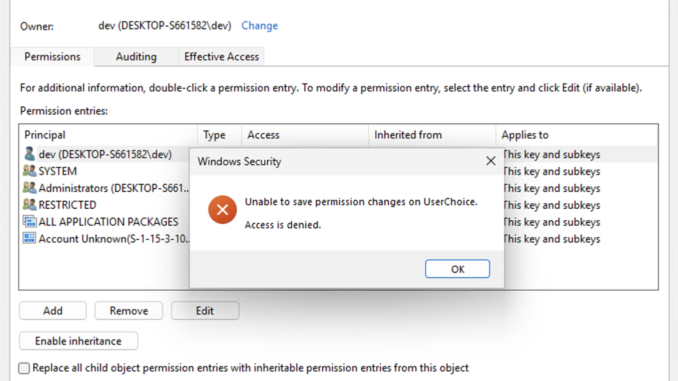
Some of the additional protected registry keys can be seen in the following screenshot:

If a non-Microsoft application tries to modify these keys, it will get an ACCESS_DENIED error. However, a user can still change these settings through the Windows GUI (Settings, Taskbar, etc.), since most Windows binaries are allowed to make those changes.
There is another important detail about UCPD.sys: it generates a lot of telemetry data, which gets sent back to Microsoft. For example, if you change the default browser, the current setting, the new setting, and even the binary that modified the corresponding registry keys are all reported to Microsoft – including the type of modification (write, delete, rename, etc.). Big Brother is watching you! In my tests, however, this data only was acessible when Windows was configured to send optional diagnostic data (which is mandatory for Insider builds, for example).
But let’s dive into the details of this driver’s features:
Blocking Registry Key Changes by Third-Party Applications
As described above and in my last blog post, UCPD.sys mainly protects the modification of specific registry keys. The list of protected keys can vary depending on the region or the Windows edition.
Currently the driver contains code to protect the UserChoice and UserChoiceLatest keys for following protocols and extensions: http, https, .pdf, .htm, .html, .doc, .docx, .xls, .xlsx, .ppt, .pptx
And it also protects the following keys related to Windows features and the UI:
SOFTWARE\Microsoft\Windows\CurrentVersion\Feeds- Value:
ShellFeedsTaskbarViewMode
- Value:
SOFTWARE\Microsoft\Windows\CurrentVersion\Feeds- Value:
IsFeedsAvailable
- Value:
SOFTWARE\Microsoft\Windows\CurrentVersion\NandI- Value:
Control
- Value:
SOFTWARE\Policies\Microsoft\Windows\Windows Feeds- Value:
EnableFeeds
- Value:
Software\Microsoft\Windows\CurrentVersion\Explorer\Advanced- Value:
TaskbarDa
- Value:
SOFTWARE\Policies\Microsoft\Dsh- Value:
AllowNewsAndInterests
- Value:
Software\Microsoft\Windows\CurrentVersion\Explorer\Taskband- Value:
Favorites
- Value:
Software\Microsoft\Windows\CurrentVersion\Explorer\Taskband- Value:
FavoritesResolve
- Value:
Software\Microsoft\Windows\Shell\BrandedKey- Value:
BrandedKeyChoiceType
- Value:
Software\Microsoft\Windows\Shell\BrandedKey- Value:
AppAumid
- Value:
Software\Microsoft\Windows\CurrentVersion\SearchSettingsSoftware\Microsoft\Windows\CurrentVersion\SearchSoftware\Microsoft\Windows\CurrentVersion\Feeds
I won’t go into detail about what each of these keys does exactly – they can easily be looked up online. What’s important is that these keys can no longer be changed automatically by non-Microsoft applications.
Blocking ACL Changes to Protected Registry Keys
Until UCPD.sys v4.2, it was possible to modify the ACL of a protected registry key. This was especially important in the case of file type associations because the UserChoice keys have a deny write ACL set for the current user. By using RegSetKeySecurity, I was able to reset the ACL and thereby restore write permissions. I used this little trick in SetUserFTA to make my life easier, but shortly after I had implemented it, UCPD.sys also started blocking ACL changes.

Registry Value Deletion Protection
This protection is also new in UCPD.sys v4.3 and is not yet active. I discovered that I could still delete the ProgId and Hash values from the protected UserChoice registry key – but not the UserChoice key itself. UCPD.sys was already blocking modifications to these values, but it was still possible to delete them. This was helpful when we wanted to reset or remove an association protected by UCPD.sys. I updated SetUserFTA to use this approach, but shortly afterwards, the new version of the driver introduced code to block it. Currently, this feature only applies to the Office extensions.

Dynamic Rules – Configuration Updates for UCPD.sys
I had already posted about this change on Twitter, but didn’t share too many details. This feature uses a registry key to load a kind of pattern update for the driver. It can include a DenyList, AllowList, and other content that extends the driver’s functionality. With this, Microsoft can block unwanted apps from modifying protected registry keys basically on the fly – no driver update or reboot needed! I haven’t yet seen a machine with this feature activated, so I can’t say exactly what the rules contain (manually enabling it didn’t create any rules). The value is encrypted and signed, so it won’t be editable anyway.
The rules are stored in this registry key:
HKLM\SYSTEM\CurrentControlSet\Services\UCPD\DR
Self-Defense: Protecting UCPD.sys Service Keys
UCPD.sys v4.3 now contains code that can protect its own registry keys. I had used the FeatureV2 key in a proof of concept to spoof features of the driver. This allowed me, for example, to re-enable blocked binaries without changing any other Windows configuration settings. I never released this code or shared this idea publicly, but now this method will be blocked as well. By the way, this protection also covers the dynamic rules key.
The driver gets its configuration from the following key (which it can now protect itself):
HKLM\SYSTEM\CurrentControlSet\Services\UCPD
Value: FeatureV2
Unknown File Handler Protection
When a user double-clicks a file with an unknown extension, Windows will catch this and show the OpenWith.exe dialog, allowing you to select an installed application to open that file type.
An attacker could override this behavior by replacing the path to OpenWith.exe with a path to a malicious file. It looks like this has happened in the wild, so Microsoft now protects these keys accordingly.
UCPD.sys will restore the contents of these keys if they do not contain the original values:
SOFTWARE\Classes\Unknown\shellSOFTWARE\Classes\Unknown\shell\open\commandSOFTWARE\Classes\Unknown\shell\openas\command

File Rename Protection
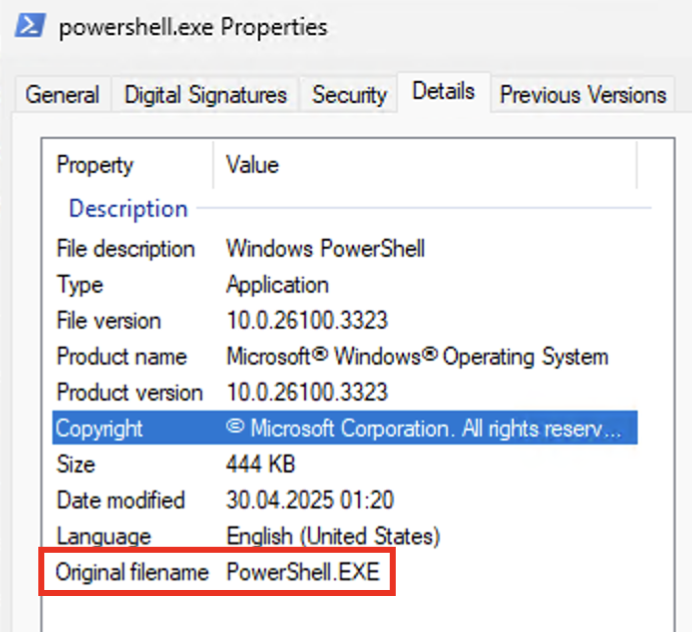
One of the first workarounds I discovered was renaming blocked binaries like powershell.exe. If you copied the executable and renamed it to powershell2.exe, it would bypass UCPD.sys because the the driver only compared the file name against a static list.
UCPD.sys v4.3 now includes code that can detect this attack by checking the PE resources and comparing the actual file name against the OriginalFilename value.
This workaround has been widely used all over the internet, and even VMware used this trick in their DEM solution. They simply copied rundll32.exe to a temporary location, renamed it, and used it to execute their DLL.
Currently, this detection code is not generally active, but Microsoft is most likely A/B testing it right now.
Conclusion
UCPD.sys has become quite a sophisticated protection system in the meantime. There are other features that I won’t describe in detail, as they target specific regions or publishers and therefore don’t apply to everyone anyway.
Update 17.09.2025: The cat is out of the bag, and someone else has published the details I had preferred to keep to myself: UCPD.sys regional restrictions
Currently, UCPD.sys blocks the following types of attacks on Windows 11 Pro:
- Write, delete, rename, and ACL changes to the keys listed above
- File type associations for all the extensions mentioned above
- Injection attacks for a defined list of publishers
- UI automation attacks, also for a set of publishers
- Unknown file type registry key modifications
- RegRenameKey attacks
The driver has actually evolved a lot since my last blog post, and it now includes some very advanced techniques to protect Windows against malicious attacks. I’ve learned a lot from this, and it’s always fun to analyze the new protections whenever a new UCPD.sys version is released.
However, the downside is that Microsoft does not document, comment on, or offer any administrative utilities to manage these protections. While they do serve a good purpose, they are not desired in every environment. In particular, the file type associations are causing a lot of headaches, which is why I am still offering and actively updating SetUserFTA accordingly.
Leave a Reply
You must be logged in to post a comment.